

Choosing an AI Agent for operations: evidence, actions, and control
Evaluate observability and incident-response Agents by the data they can access, the investigations they can perform, their tool permissions, and their full operating cost.
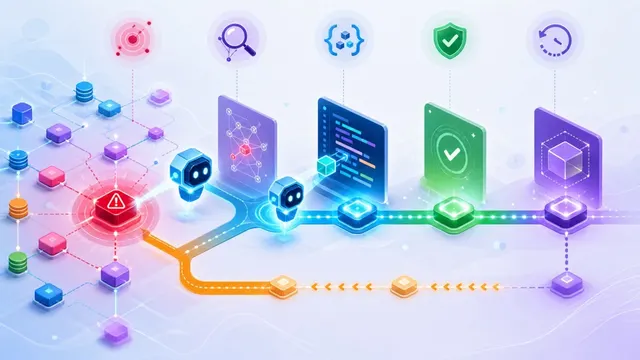
An operations Agent becomes useful when it can take a specific task far enough to save an engineer work: investigate an alert, assemble evidence for an incident review, or explain a change in cloud spending. A chat window is only the interface. The capabilities behind it determine what the team can safely delegate.
Three questions make the evaluation concrete. What evidence can the Agent read? What actions can it take? If it reaches the wrong conclusion or a tool call fails, can you reconstruct what happened?
This comparison covers four approaches: Agents built into an integrated observability platform, AI investigation features in an existing platform, Agents in incident-response tools, and an open-source alerting stack connected to custom AI workflows. None has an automatic advantage in every environment. Existing instrumentation and the cost of connecting missing context often decide the result.
Published by Guance. This comparison is based on product documentation reviewed on October 13, 2026; it does not report a hands-on benchmark of the platforms.
Distinguish assistance, analysis, and delegated work
A Copilot usually supports an engineer's interactive work: explain a chart, construct a query, or summarize the selected events. A focused AI feature may cluster errors or detect anomalies without taking responsibility for the subsequent investigation. An Agent can carry a task through several steps by selecting tools, examining results, and deciding what to do next.
These are useful distinctions for evaluation, not universal product labels. A feature called a Copilot may invoke tools, while an Agent may be configured as read-only. Test the behavior rather than inferring it from the name.
Model Context Protocol (MCP) is one way to connect AI clients to tools and data. Its presence can reduce integration work, but it does not automatically make a tool safe or an investigation complete. You still need authentication, limited permissions, appropriate data handling, and logs of what the client requested.
Start with investigation as the delegated task. Add execution only when a procedure has clear prerequisites, a bounded effect, and a way to verify recovery.
Platform-native Agents: Guance
Guance's starting point is its observability data: metrics, logs, traces, events, and real user monitoring (RUM). A shared platform can reduce the work of gathering related evidence, provided the affected services are instrumented and consistently identified.
Guance separates interactive assistance from task-based Agent work:
Obsy AI Copilot helps analyze the current observability context. During a trial, inspect whether the selected service, filters, and time range carry into the analysis correctly. Ask it to show the query or event that supports each material conclusion, rather than accepting a fluent restatement of the alert.
Agent Teams is a workspace for Agents with defined responsibilities, Skills, MCP services, and assigned tasks. Teams can configure visibility and available capabilities, use scheduled work, and connect external events to task intake. The Agent Teams documentation describes those configuration steps. An Agent intended for incident analysis should receive only the tools and context that role requires.
OWL CLI and MCP Server make Guance capabilities available to terminal workflows and compatible AI clients. Engineers can connect existing tools, including coding assistants, to authorized observability queries. A CLI interface and an MCP interface are different access paths; inspect the operations and credentials available through each. The OWL MCP quick start documents the connection and configuration path.
For a remediation task, the meaningful test is an explicit workflow. Can the Agent find the affected service, collect relevant evidence, propose a change, follow the approval policy, execute through an authorized tool, and check the result? A code fix may need repository and CI access; a rollback may need deployment access. Neither is implied by the ability to query Guance.
Guance is worth evaluating when the organization wants investigation and telemetry delivered together, or needs a deployment model that fits private-environment requirements. Check model inference and connected-tool data paths independently of where telemetry is stored. Obtain current Agent, usage, and deployment pricing for the intended region; a historic China-region subscription figure is not a universal quote.
AI investigation in Datadog or Dynatrace
An organization that already has useful coverage in Datadog or Dynatrace should test that platform's investigation features early. Existing service maps, telemetry, and identity configuration can reduce the amount of integration work needed for a trial.
Datadog Bits Investigation and Dynatrace Intelligence provide investigation mechanisms to evaluate. The latter documents topology-based causal analysis and labels some Agent-driven action capabilities Preview. Ask each to investigate the same known failure and compare the evidence, missing context, and manual work needed to reach an actionable result. A larger action catalog or a causal-analysis label does not establish better results for your incident set.
Also distinguish investigation from execution. Check which workflows or action tools are enabled, what identity they run under, and whether a proposed change requires approval. An impressive autonomous investigation demo does not establish that every repair path is available in your edition.
The limit is the data and tools the system can actually access. That may include integrated external sources, so it is too broad to say these Agents can only inspect their own data store. It is equally unsafe to assume that an uninstrumented system will appear in the analysis without additional work.
For cost, separate the telemetry bill from AI usage and action execution. Datadog's pricing catalog contains multiple product-specific units. Do not compare an old per-investigation package with a new credit-based package without checking how consumption is calculated. Model ordinary workload and the burst of investigations that might accompany a major incident.
This route is most attractive when the existing platform already holds the evidence you need. If it does not, include the cost of adding that coverage in the comparison.
Agents in incident-response platforms
PagerDuty and incident.io approach the problem from the incident workflow: paging, ownership, coordination, status updates, and the record of what responders did. AI can help triage incoming events, assemble a summary, retrieve similar incidents, and prepare communications or a post-incident review.
The advantage is proximity to the response process. An Agent can be useful even before it diagnoses a root cause if it reduces the manual work of keeping the right people informed. Investigative depth depends on event enrichment and access to upstream telemetry, however. Test the actual integrations before classifying a response-platform Agent as either a full investigator or a summarizer.
Execution is another entitlement and integration question. A response platform may invoke a workflow or automation product, but you need to establish how approvals, credentials, retries, and completion status pass between those systems. A failed automation should not silently mark the incident resolved.
Check PagerDuty's pricing alongside its AIOps offering, and verify the selected AI and automation entitlements. incident.io's pricing lists incident response and on-call separately for some plans. Seat counts, usage charges, and the upstream monitoring bill all belong in the comparison.
This route fits teams whose main bottleneck is coordinating response across people and tools. It may avoid replacing a telemetry platform that already works well.
Open-source alerting with an AI workflow
An open-source engine such as Nightingale can evaluate alerts over existing data stores and deliver events into an AI workflow. It supports integrations with metrics and log systems and offers an edge alerting engine for sites with unreliable central connectivity.
A team can then connect a separate Agent runtime, Skills, queries, and execution tools. A Nightingale-plus-OpenClaw-style design is an example of this architectural choice, not proof of a particular root-cause accuracy or MTTR improvement. The result depends on the implementation and the incident dataset used to evaluate it.
Control is the attraction. The team decides where models run, which tools exist, how credentials are scoped, and which actions need approval. The same team must maintain connectors, normalize service identifiers, refresh runbooks, evaluate model changes, and operate the system during failures.
Include model API or hosting costs, engineering time, secrets management, audit storage, and support in the budget. Open-source licensing does not make the complete AI workflow free, and self-hosting does not guarantee data stays local if the model endpoint or a tool is external.
This approach fits organizations with established monitoring infrastructure, specific customization requirements, and engineers who can own the workflow over time. It is less attractive when the primary goal is to reduce platform maintenance immediately.
Compare what the Agent can actually do
| Dimension | Guance platform-native Agents | AI in an incumbent observability platform | Incident-response Agents | Open-source engine plus custom AI |
|---|---|---|---|---|
| Evidence | Collected telemetry and configured tools | Instrumented services and supported integrations | Incident records, enriched events, and connected telemetry | Sources the team connects and normalizes |
| Investigation | Interactive analysis and task-based work; verify the configured scope | Platform-specific investigation and topology analysis | Strong incident context; diagnostic depth depends on integrations | A workflow the team designs and evaluates |
| Actions | Authorized tools enabled for the Agent | Enabled action and workflow products | Connected automation and response workflows | Custom scripts and tool interfaces |
| Cost | Platform usage, Agent entitlements, consumption, and deployment | Telemetry plus AI and workflow consumption | Seats, AI or automation usage, plus upstream monitoring | Infrastructure, model usage, development, and support |
| Notifications | Check the selected channels and region | Check on-call and regional channel support | A core workflow, with plan and regional boundaries | Integrations that must be operated and tested |
| Data handling | Check telemetry, model, and tool paths separately | Review regions, identities, and external integrations | Review event content and connected systems | Under team control only to the extent actually configured |
| Best initial fit | Consolidated investigation and flexible deployment requirements | Existing customers with good signal coverage | Teams centered on response coordination | Teams with platform capacity and unmet customization needs |
Run five acceptance tests
Evidence coverage. Replay or safely reproduce a known failure. Inspect which signals the Agent consulted and whether those signals support the conclusion. More data types are not automatically better; the important question is whether the relevant evidence was available and used correctly.
Task completion. Run one complete path from alert to investigation to a notification or approved action. Record every point where a person has to copy data, select a service, or repair an integration. That manual work belongs in the operating-cost estimate.
Traceability and control. Require source references for conclusions and records of tool calls. Test an out-of-scope request, an expired credential, and a tool failure. For actions, verify approval, completion checks, and the behavior when recovery does not occur.
Cost under load. Calculate normal and peak usage over the planning period. Include repeated investigations of related alerts, long-running tasks, retries, model usage, and any separate automation charges. A seat price alone will not describe an Agent's cost.
Integration flexibility. Test the required API, CLI, or MCP integration with the AI tools your engineers already use. Confirm authentication and field-level or workspace access where relevant. An open protocol is helpful only if the authorized tools expose the operations you need.
Frequently asked questions
Can an Agent replace the on-call engineer?
Use a narrower acceptance criterion: which recurring tasks can it complete to an agreed standard? Initial triage, evidence collection, and review drafts are often sensible places to begin. Service ownership, risk acceptance, and unusual recovery decisions still need accountable people.
How do we judge a root-cause conclusion?
Use incidents with known causes and inspect the cited evidence. Distinguish a confirmed cause from a plausible hypothesis, and track cases where necessary data was unavailable. A confident answer is not a substitute for a reproducible query or an identifiable event.
Should we choose the incumbent platform's Agent or an independent one?
Test the incumbent first when it already has the right data. An independent Agent can be useful if it connects missing sources or works across several systems. Compare the complete integration and governance work, including permissions and query costs. Guance Agent Teams can be evaluated alongside an existing environment, but it still needs access to the relevant evidence and tools.
How much should MCP matter?
Treat it as an integration requirement where your chosen clients support it. Verify the specific tools, authentication method, and access scope. MCP support does not certify the safety of an action or eliminate the need for audit records and approval policies.
How should we estimate the return on the investment?
Measure responder time saved on defined tasks, changes in acknowledgment and restoration time, missed or incorrectly grouped incidents, and the cost of running the workflow. Compare similar incidents before and after adoption. A vendor's published reduction percentage is a result from another environment, not a promised outcome for yours.
Before procurement, verify the current edition, deployment support, AI entitlements, and tool permissions. The useful comparison is the work each option can perform reliably in your environment at an acceptable cost.
Contact us
Join the community

to join the community
Try Guance
Start online and pay only for what you use.
Get startedChoose a Guance plan