Container Monitoring

Find container failures with workload and release context

Guance Container Monitoring follows Kubernetes, Docker, ECS, and Fargate workloads as they are created, rescheduled, restarted, and removed. Pod health, resource use, events, logs, traces, network activity, and deployment changes stay connected so platform, SRE, and development teams can explain what failed and why.

Find container failures with workload and release context

What Container Monitoring helps you solve

Keep short-lived workloads visible long enough to find the failure

Containers can disappear before an engineer opens the console. Guance records workload state and keeps it aligned with resource pressure, application telemetry, network behavior, events, and changes so teams can distinguish a bad release from scheduling, capacity, or service failure.

A pod restarted and disappeared. Preserve its workload history and context
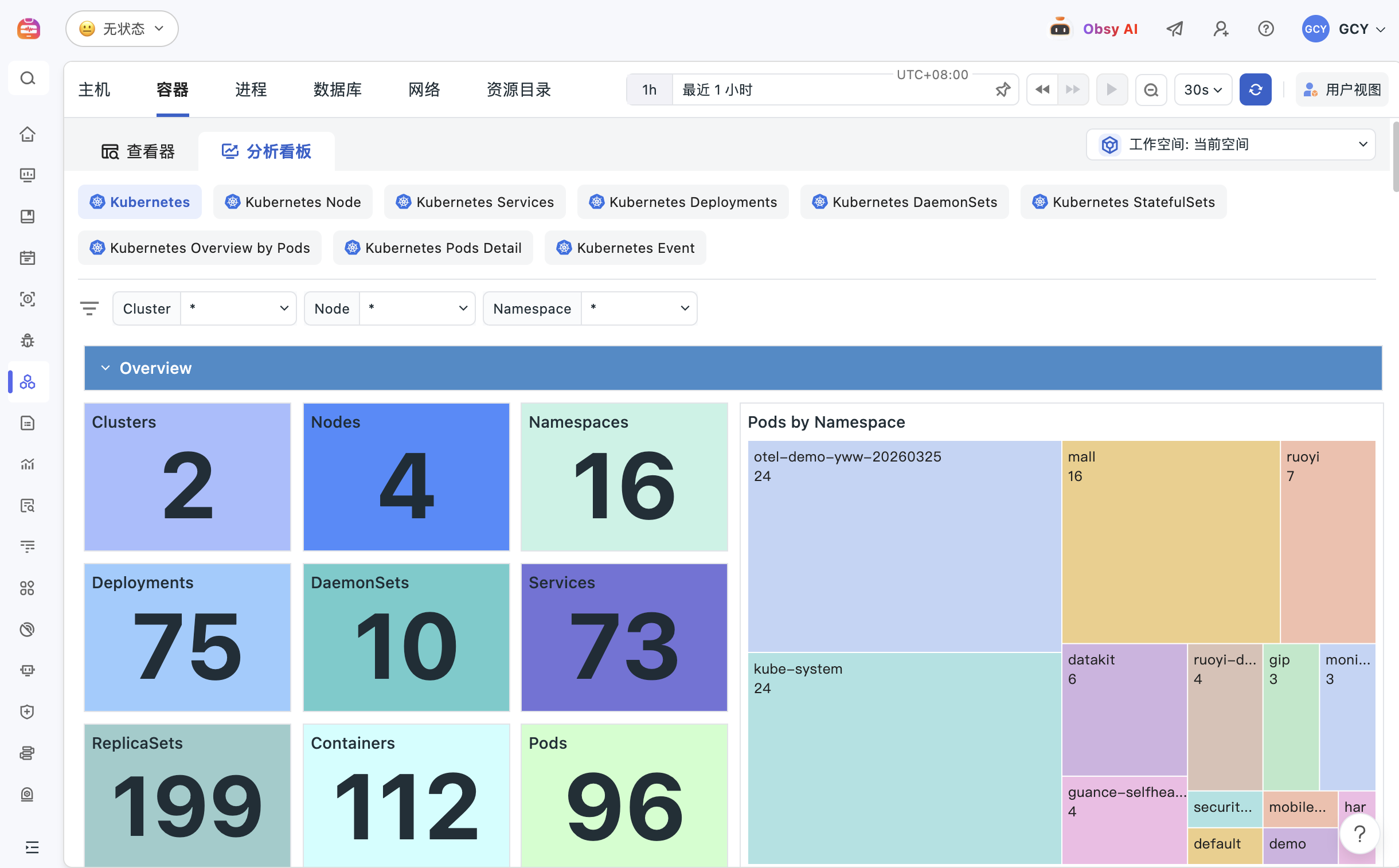
Detect container creation, termination, restart, and workload changes as they happen. Container details expose health, resource use, image, deployment metadata, and tags, while related metrics, logs, and traces preserve evidence from short-lived objects.
View documentation
A pod restarted and disappeared. Preserve its workload history and context
Start at the cluster, then narrow the issue to a node, workload, pod, or container
Use cluster, node, namespace, Pod, Service, and Deployment views to follow the affected hierarchy. When replicas drift, pods restart, nodes become pressured, or a service becomes unavailable, move through each layer without rebuilding filters in another tool.
View documentation
Monitor serverless containers without losing application evidence
Collect container metrics, logs, and traces from supported AWS Fargate environments and review them through shared dashboards. Connect latency, errors, and resource constraints to the affected application request even when the underlying hosts are not managed by your team.
View documentation
Monitor serverless containers without losing application evidence
Compare runtime symptoms with the deployment or configuration that changed
Review changes to Deployments, DaemonSets, Services, CronJobs, StatefulSets, and other workload objects beside health and performance signals. This timeline helps teams test whether a rollout, configuration update, or resource setting preceded the incident.
View documentation
Turn restarts, saturation, and unhealthy workloads into actionable alerts
Create monitors for node, pod, container, workload, and service conditions. Route the alert with the affected object and links to related logs, traces, network data, and events so responders can continue from detection to investigation.
View documentation
Turn restarts, saturation, and unhealthy workloads into actionable alerts

Frequently asked questions

What is container monitoring?

Container monitoring continuously tracks containers, pods, workloads, resource requests and limits, restarts, logs, and deployment events. It preserves operational context even when short-lived objects change or disappear.

Which container and Kubernetes signals should teams monitor?

Common signals include CPU, memory, network, disk, restart count, exit state, resource requests and limits, replica health, node pressure, workload events, and related logs. The useful set depends on the platform and service objective.

How does Guance connect container monitoring with APM and logs?

Shared service, environment, host, pod, container, and trace attributes let teams move from a slow or failed request to the relevant workload metrics and logs, then compare the result with network and deployment context.

Can Guance monitor serverless containers?

Guance supports documented AWS Fargate collection scenarios for container metrics, logs, and traces. Exact coverage and setup depend on the ECS or Kubernetes environment and the selected collector configuration.


Connect container health to the services and infrastructure behind it

Explore infrastructure, APM, Kubernetes, observability guides, documentation, and pricing.

Get started > View documentation > View pricing >