Contact us

Join the community

Scan with WeChat
Join the official community group

Try Guance

Start online with usage-based pricing and a true cloud service.

Get started

Choose a Guance edition

Code repositories

Event Management

Event center

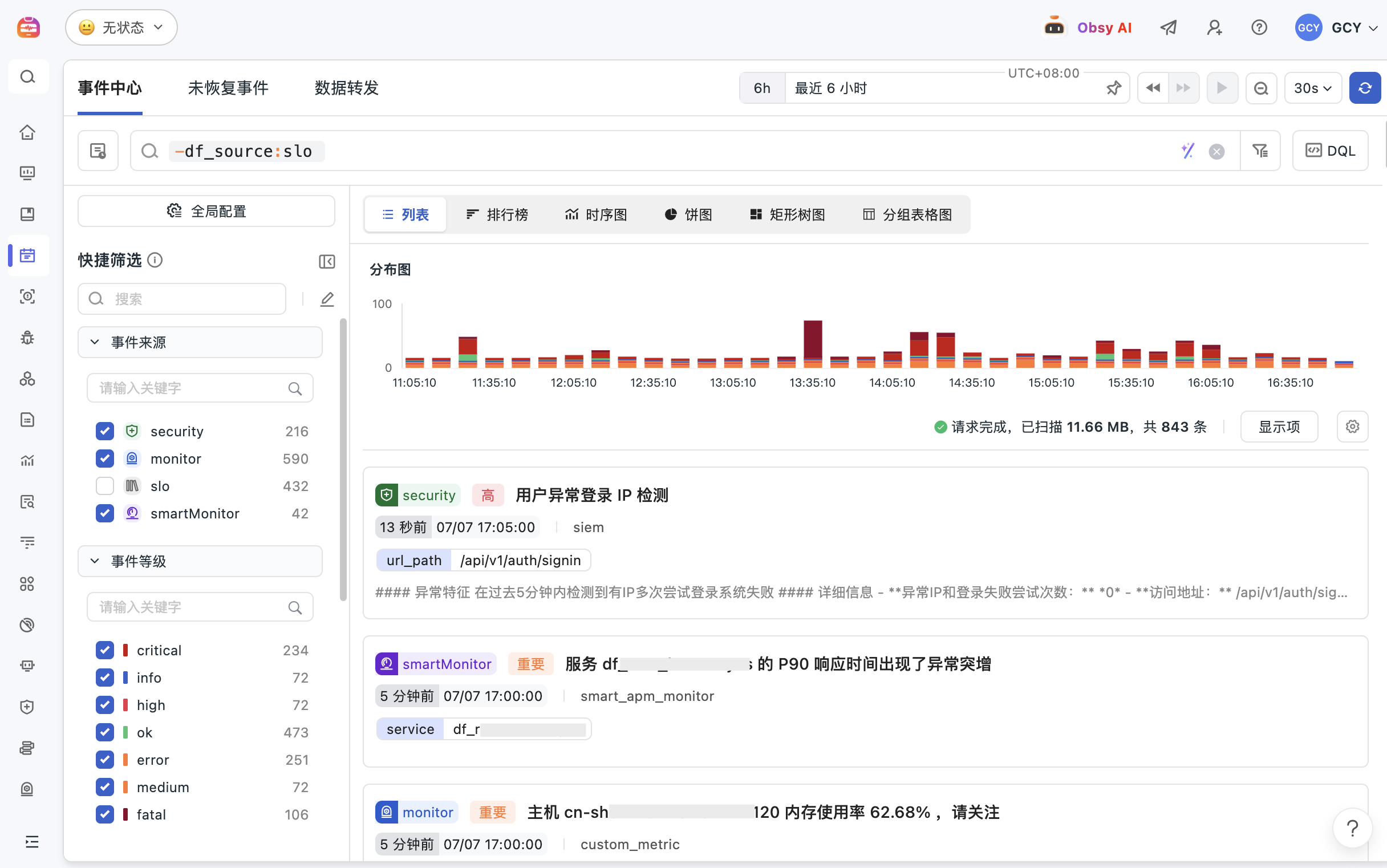
Guance Incident Center centrally manages monitoring alerts, system anomalies, Kubernetes changes, security events, and custom events, bringing event aggregation, impact analysis, notification response, and handling tracking into one entry point, helping SRE, operations, and security teams reduce alarm noise and improve fault response efficiency.

The center of the event
Book a demo

The incident center addresses the issue

Converging distributed alerts, changes, and security events into manageable response queues

When alerts, changes, security risks, and business anomalies are scattered across different tools, teams find it difficult to determine priorities and scope of impact. The Incident Center aggregates multi-source events and links them to logs, links, infrastructure, SIEM, and alert policies, enabling teams to move from "receiving notifications" into a closed loop of "assessing impact, locating causes, and advancing action."

Alerts are too scattered? First, put monitoring, changes, and security events into one entry point
The Incident Center integrates monitoring alerts, system anomalies, infrastructure changes, Kubernetes events, security detection, and custom business events. Teams can uniformly filter by source, level, service, host, responsible person, and time frame to quickly determine which events need to be prioritized.
Alerts are too scattered? First, put monitoring, changes, and security events into one entry point
Is the fault caused by changes? Let's look at the release, configuration, and cluster changes together
The event center can record changes related to Kubernetes clusters, infrastructure, configurations, and code releases. When encountering service anomalies, resource jitter, or user experience declines, the team can trace the change history along the timeline to determine whether the issue is related to release, scaling, or configuration adjustments.
The event is not isolated; you need to keep tracking the logs, links, and resource status
Event details can be linked to logs, traces, metrics, infrastructure objects, and alert context, helping teams continue to trace the scope and possible causes of an incident. For storms of events or repeated alerts, aggregation and notification strategies can also reduce noise, allowing on-duty personnel to address what truly matters first.
The event is not isolated; you need to keep tracking the logs, links, and resource status
Security incidents must also enter the same response process to avoid risks remaining only in the form of alerts
The event center can take over SIEM Detection results and security alerts incorporate abnormal logins, configuration audits, permission changes, and potential attack behaviors into unified analysis. Security, operations, and SRE teams can collaborate within the same event context, shortening the time from risk discovery to closed-loop resolution.

Frequently asked questions

What is an event center?

The Incident Center is used to unify the management of monitoring alerts, system anomalies, change logs, security events, and custom business events, helping teams determine event priority, impact scope, and handling status.

What is the difference between an event center and a monitoring alert?

Monitoring and alerting are responsible for detecting anomalies and notifying the team. The incident center further aggregates alerts, changes, security, and business events into a single entry point, linking logs, links, metrics, and resource contexts to support a closed-loop analysis and handling process.

How does the incident center help troubleshoot faults?

When a failure occurs, the team can view relevant alerts, changes, and exceptions in the event center by timeline, and jump to logs, traces, infrastructure metrics, or security events to determine whether the issue is triggered by release, resource, dependency, or security risk.

Explore more

Resources and further reading

Choose the next step from product documentation, related solutions, and technical guidance.

Related reading

Selected product practices, troubleshooting guidance, and technical solutions

Want to see how the event center falls into your business system?

Book a demo