.NET Core 服务实现监控可观测性最佳实践
本次实践主要是介绍 .Net Core 服务通过无侵入的方式接入观测云进行全面的可观测。
前言
本次实践主要是介绍 .Net Core 服务通过无侵入的方式接入观测云进行全面的可观测。
环境信息
- 系统环境:Kubernetes
- 编程语言:.NET Core ≥ 2.1
- 日志框架:Serilog
- 探针类型:ddtrace
接入方案
准备工作
DataKit 部署
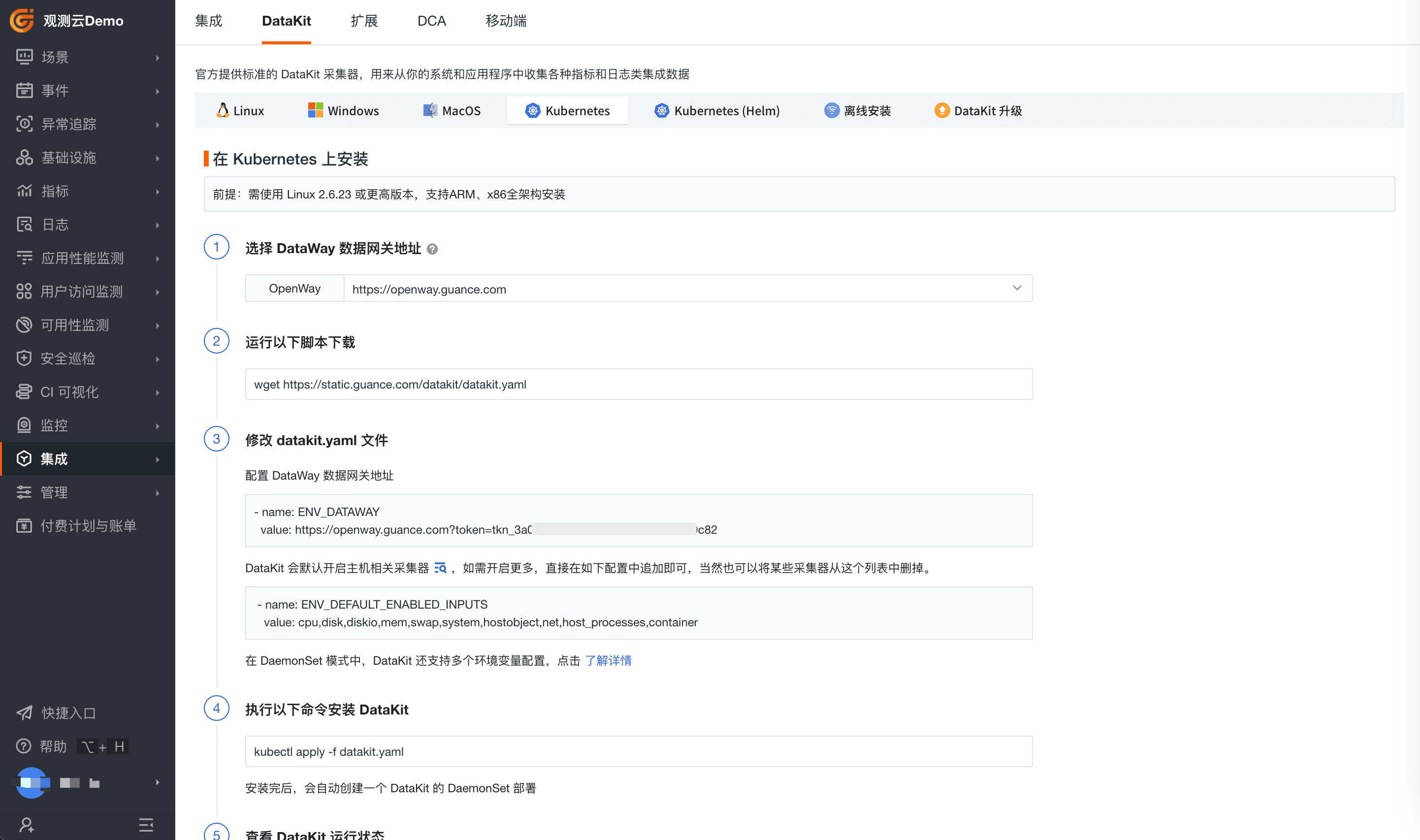
DataKit 采⽤ k8s Daemonset 控制器管理,用于采集和接收指标、日志、链路等数据。进入观测云控制台-「集成」-「DataKit」- 「Kubernetes」或 「Kubernetes(helm)」,支持 yaml 或 Helm 方式安装 DataKit。
DataKit 详细介绍可参考官方文档:https://docs.guance.com/datakit/
开启 ddtrace 采集器
- 修改 datakit.yaml,加入 ddtrace ConfigMap
apiVersion: v1
kind: ConfigMap
metadata:
  name: datakit-conf
  namespace: datakit
data:
  #### ddtrace
  ddtrace.conf: |-
    [[inputs.ddtrace]]
      endpoints = ["/v0.3/traces", "/v0.4/traces", "/v0.5/traces"]
配置参数参考:https://docs.guance.com/integrations/ddtrace/
- 修改 datakit.yaml,挂载配置至容器中
apiVersion: apps/v1
kind: DaemonSet
metadata:
  labels:
    app: daemonset-datakit
  name: datakit
  namespace: datakit
spec:
  ...
  template:
    ...
    spec:
      ...
      containers:
      - env:
        ...
        volumeMounts:
        ...
        - mountPath: /usr/local/datakit/conf.d/ddtrace/ddtrace.conf
          name: datakit-conf
          subPath: ddtrace.conf
        ...
探针下载
根据版本和架构选择不同的探针:https://github.com/DataDog/dd-trace-dotnet/releases
- .NET 7 探针链接:https://github.com/DataDog/dd-trace-dotnet/releases/tag/v2.21.0
- .NET 6 探针链接:https://github.com/DataDog/dd-trace-dotnet/releases/tag/v2.18.0
以 debian 环境为例:
- .NET 7-debain-下载链接:
- .NET 6-debain- 下载链接:
基础镜像改造
修改基础镜像 Dockerfile ,推荐维护一个已注入探针的 .NET 基础镜像,可为其他 .NET 应用复用。
- 探针建议安装 base 镜像阶段操作,避免 build 阶段丢失安装包
- 需将探针包存放置工作目录中,如下举例工作目录为 /app/, 可按需修改
- 以下例子以 .NET7 接入为例,.NET6 接入需替换对应探针
COPY  ./datadog-dotnet-apm_2.21.0_amd64.deb /app/datadog-dotnet-apm_2.21.0_amd64.deb
RUN dpkg -i ./datadog-dotnet-apm_2.21.0_amd64.deb &&  mkdir -p /var/log/datadog/dotnet && chmod a+rwx /var/log/datadog/dotnet
环境变量注入
在服务的 deployment 中添加环境变量,以下变量值可按需修改,其余默认不变。
- DD_SERVICE:自定义服务名称
- DD_VERSION: 自定义服务版本
- DD_ENV : 指服务的部署环境标签,这里可默认填写 “test”
      - name: DD_AGENT_HOST
        valueFrom:
          fieldRef:
            apiVersion: v1
            fieldPath: status.hostIP
      - name: DD_TRACE_AGENT_PORT
        value: "9529"
      - name: DD_SERVICE
        value: member
      - name: DD_ENV
        value: test
      - name: DD_VERSION
        value: v1.0
      - name: DD_DOTNET_TRACER_HOME
        value: /opt/datadog
      - name: DD_LOGS_INJECTION
        value: "true"
      - name: DD_RUNTIME_METRICS_ENABLED
        value: "true"
      - name: CORECLR_PROFILER
        value: "{846F5F1C-F9AE-4B07-969E-05C26BC060D8}"
      - name: CORECLR_ENABLE_PROFILING
        value: "1"
      - name: CORECLR_PROFILER_PATH
        value: "/opt/datadog/Datadog.Trace.ClrProfiler.Native.so"
      - name: DD_DOTNET_TRACER_HOME
        value: "/opt/datadog"
日志输出格式改造
在项目的 .csproj 里声明依赖引用,如:
- Datadog.Trace.Bundle 版本需要根据不同版本修改,.NET6 的版本应为:"2.18.0"
- Serilog的版本根据项目引用版本即可
<Project Sdk="Microsoft.NET.Sdk">
  <PropertyGroup>
    <OutputType>Exe</OutputType>
    <TargetFrameworks>net7.0;net462</TargetFrameworks>
    <Platforms>AnyCPU;x64;x86</Platforms>
  </PropertyGroup>

  <ItemGroup>
    <PackageReference Include="Datadog.Trace.Bundle" Version="2.21.0" />
    <PackageReference Include="Serilog" Version="2.9.0" />
  </ItemGroup>
</Project>
日志输出文件格式需要引入 Datadog.Trace 包 ,如:
...
using Datadog.Trace;
...
在日志文件输出中 Enrich FromLogContext()函数,如:
            var loggerConfiguration = new LoggerConfiguration()
                                          .Enrich.FromLogContext()
                                          .MinimumLevel.Is(Serilog.Events.LogEventLevel.Information);
在输出的日志格式中添加 {Properties},如:
            // When using a message template, you must emit all properties using the {Properties} syntax in order to emit the Datadog properties (see: https://github.com/serilog/serilog/wiki/Formatting-Output#formatting-plain-text)
            // This is because Serilog cannot look up these individual keys by name due to the '.' in the Datadog property names (see https://github.com/serilog/serilog/wiki/Writing-Log-Events#message-template-syntax)
            // Additionally, Datadog will only parse log properties if they are in a JSON-like map, and the values for the Datadog properties must be surrounded by quotation marks
            //
            // Additions to layout:
            // - {Properties}
            //
            loggerConfiguration = loggerConfiguration
                                      .WriteTo.File(
                                          Path.Combine(AppContext.BaseDirectory, "log-Serilog-textFile.log"),
                                          outputTemplate: "{Timestamp:yyyy-MM-dd HH:mm:ss.fff zzz} [{Level:u3}] {Properties} {Message:lj} {NewLine}{Exception}");
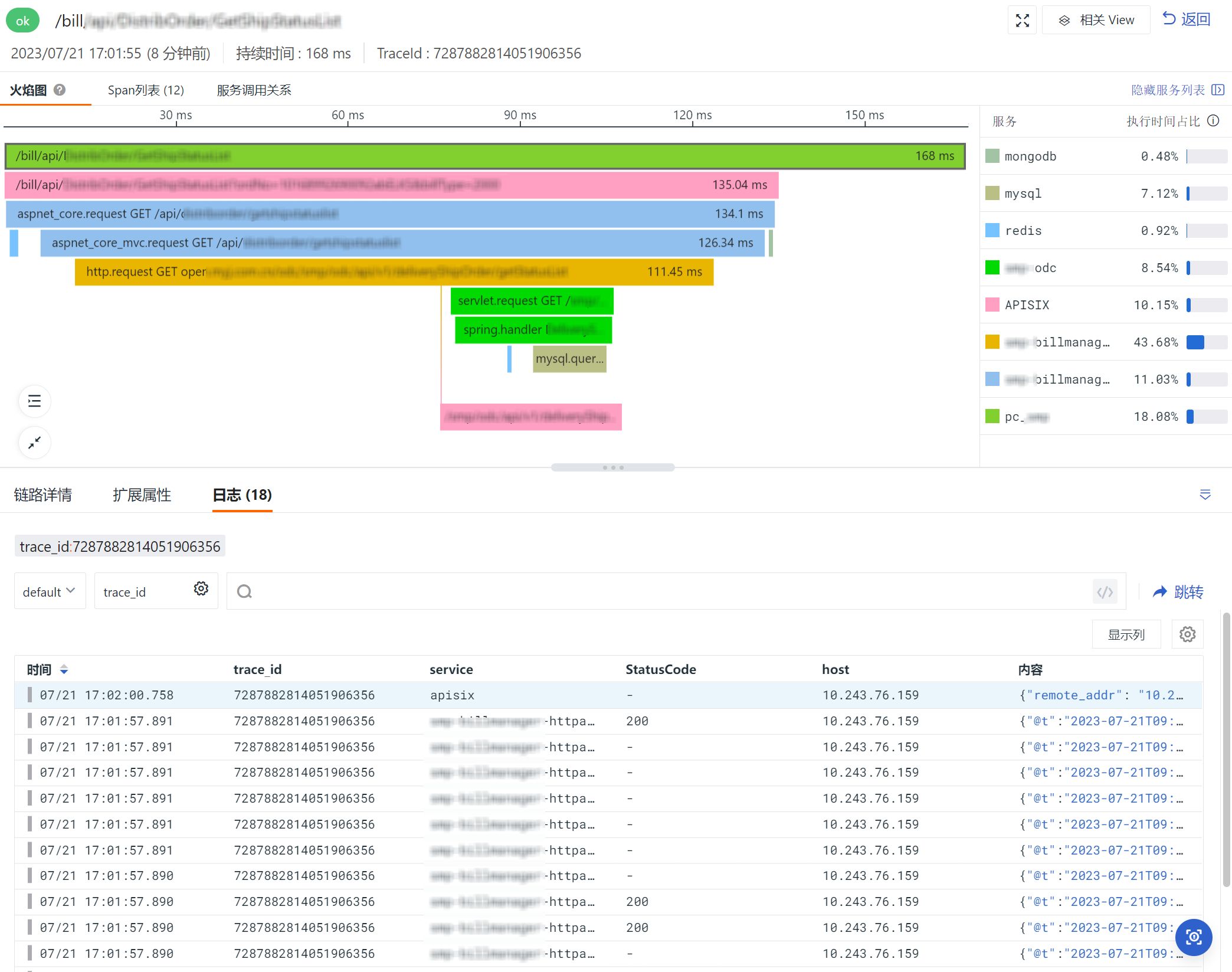
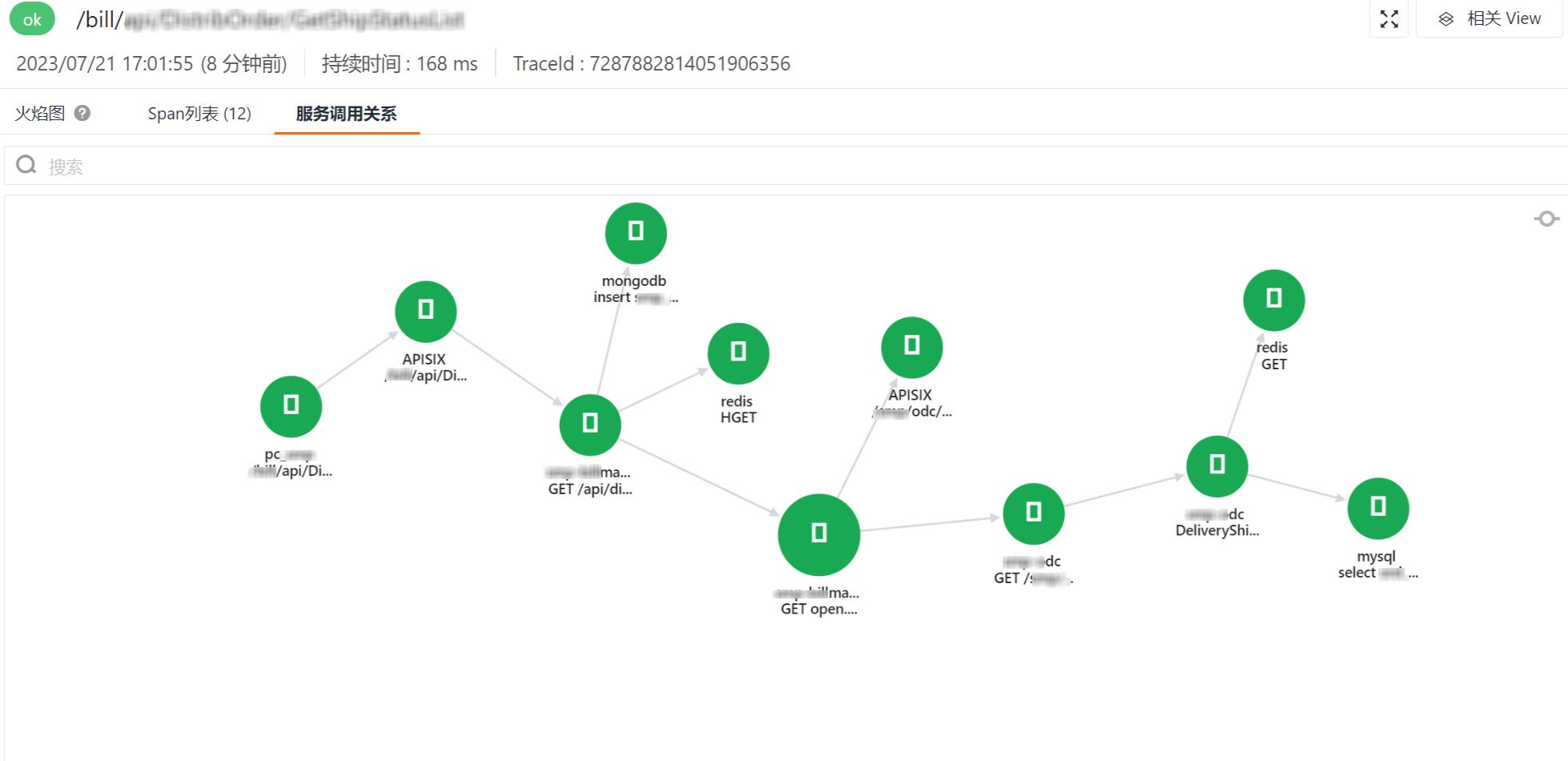
实践效果
Get a tailored plan
Contact us
Join the community

Scan with WeChat
to join the community
to join the community
Try Guance
Start online and pay only for what you use.
Get startedChoose a Guance plan