华为云 LTS 日志上报观测云最佳实践(二)
本文介绍如何将 LTS 中的日志实时上报到观测云,实现日志与应用、基础设施、用户体验等一体化观测。

一、背景与挑战
在实际运维场景中,客户的业务系统部署在华为云,并使用了 ELB、GaussDB 等多种华为云产品。这些云产品的日志集中管理主要依赖华为云 LTS,但仅仅把日志存放在 LTS 中,难以实现:
- 全链路观测(日志、指标、链路数据统一)
- 智能检索与告警(跨集群、跨应用的日志分析)
- 和业务指标结合的可视化与追踪
观测云可以实现统一的全链路可观测,因此可以将 LTS 中的日志实时上报到观测云,实现日志与应用、基础设施、用户体验等一体化观测。
二、整体架构设计
日志采集链路推荐架构如下:
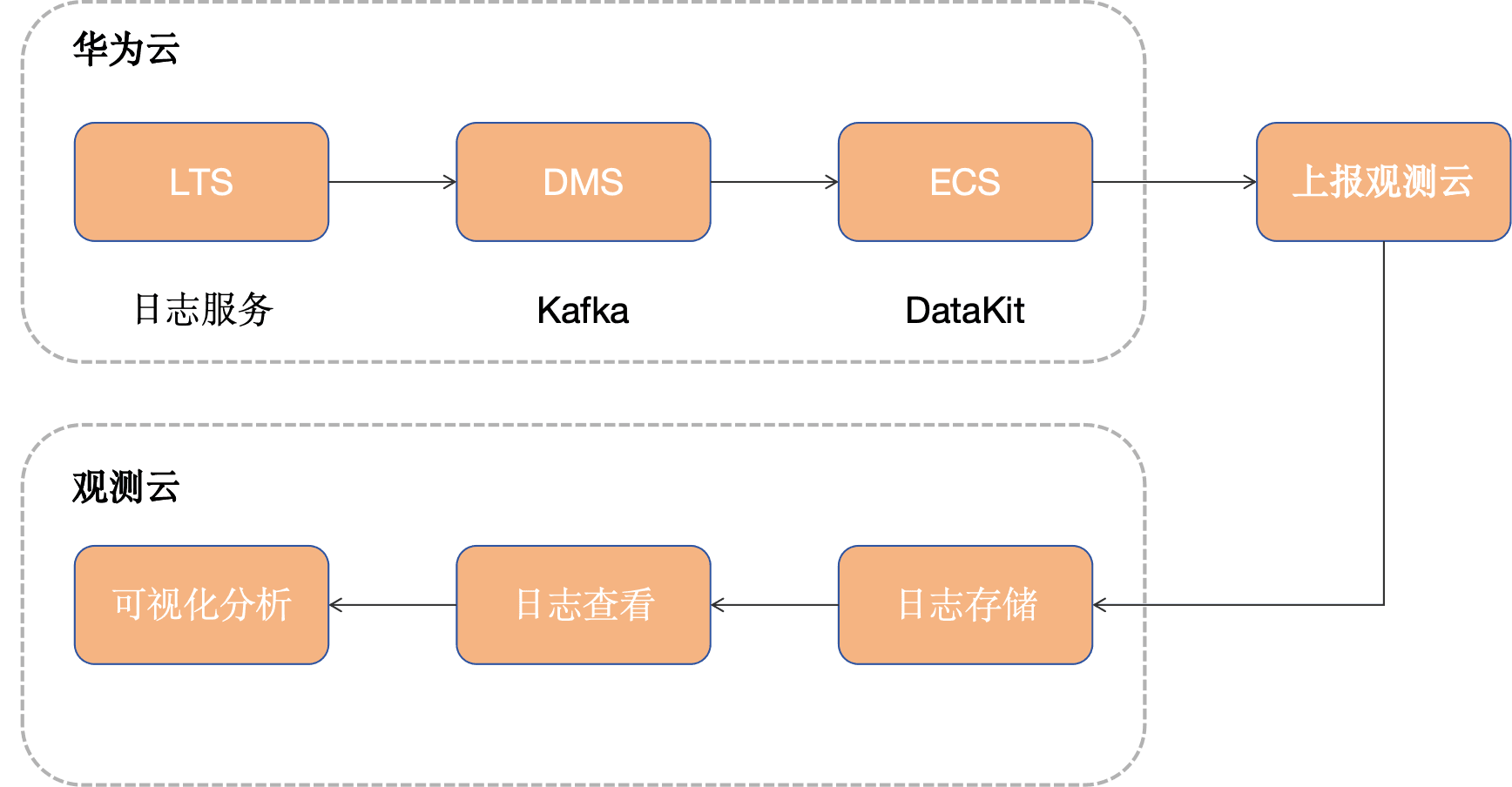
- LTS:负责日志收集与集中管理。
- DMS Kafka:作为高可靠消息通道,实现日志实时转储与解耦。
- DataKit Kafka Input:部署在客户侧(如弹性云服务器),负责消费 Kafka 中日志并发送到观测云。
- 观测云:统一日志检索、查询分析、仪表盘展示、智能告警。
三、前置条件
- 在华为云上创建 DMS 和 LTS 服务
- 开通观测云账号
- DataKit 机器一台
四、配置步骤
步骤 1:在 LTS 中开启日志转储
我们可以通过很多种方式把日志输出至 LTS 服务,本文以 华为云ELB日志为例,配置 ELB日志存储至 LTS ,配置完成之后我们可以查看在 LTS 日志组中是否有日志产生。
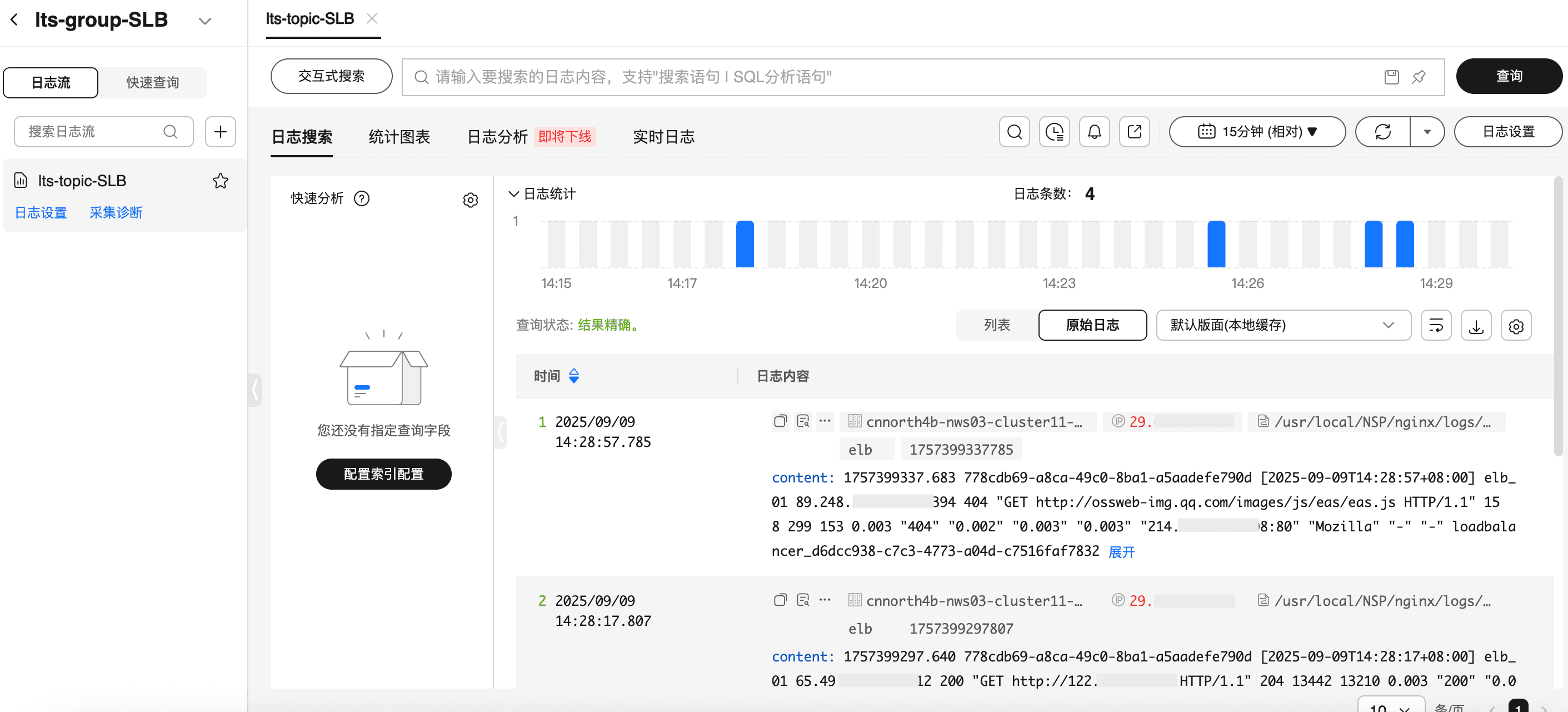
1、登录华为云控制台 → LTS控制台。
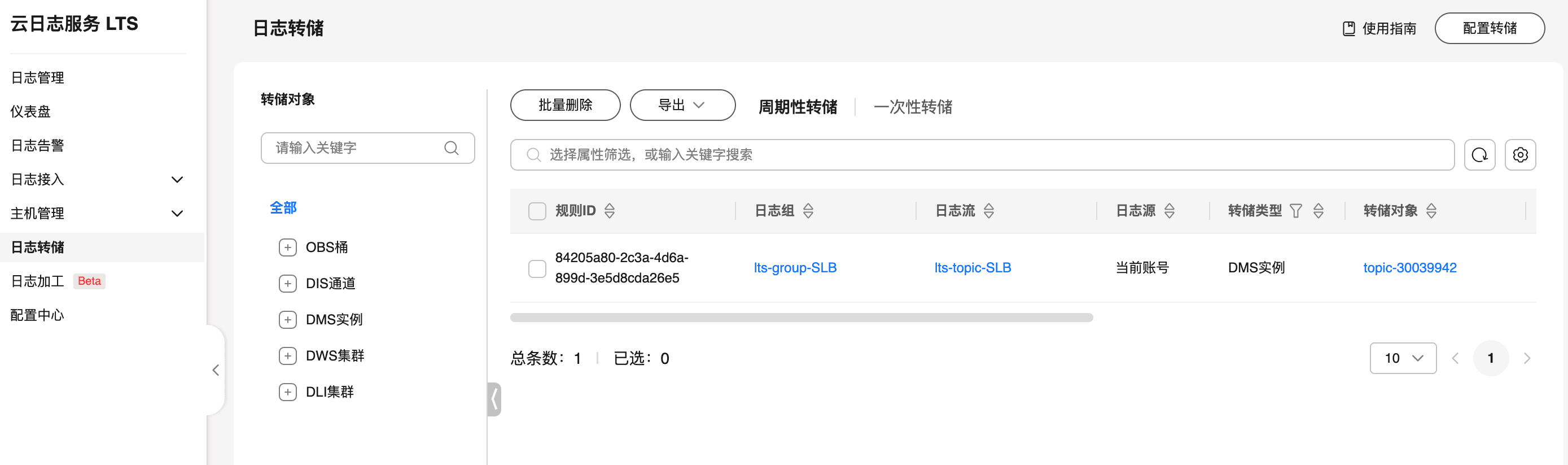
2、点击 “日志转储”。
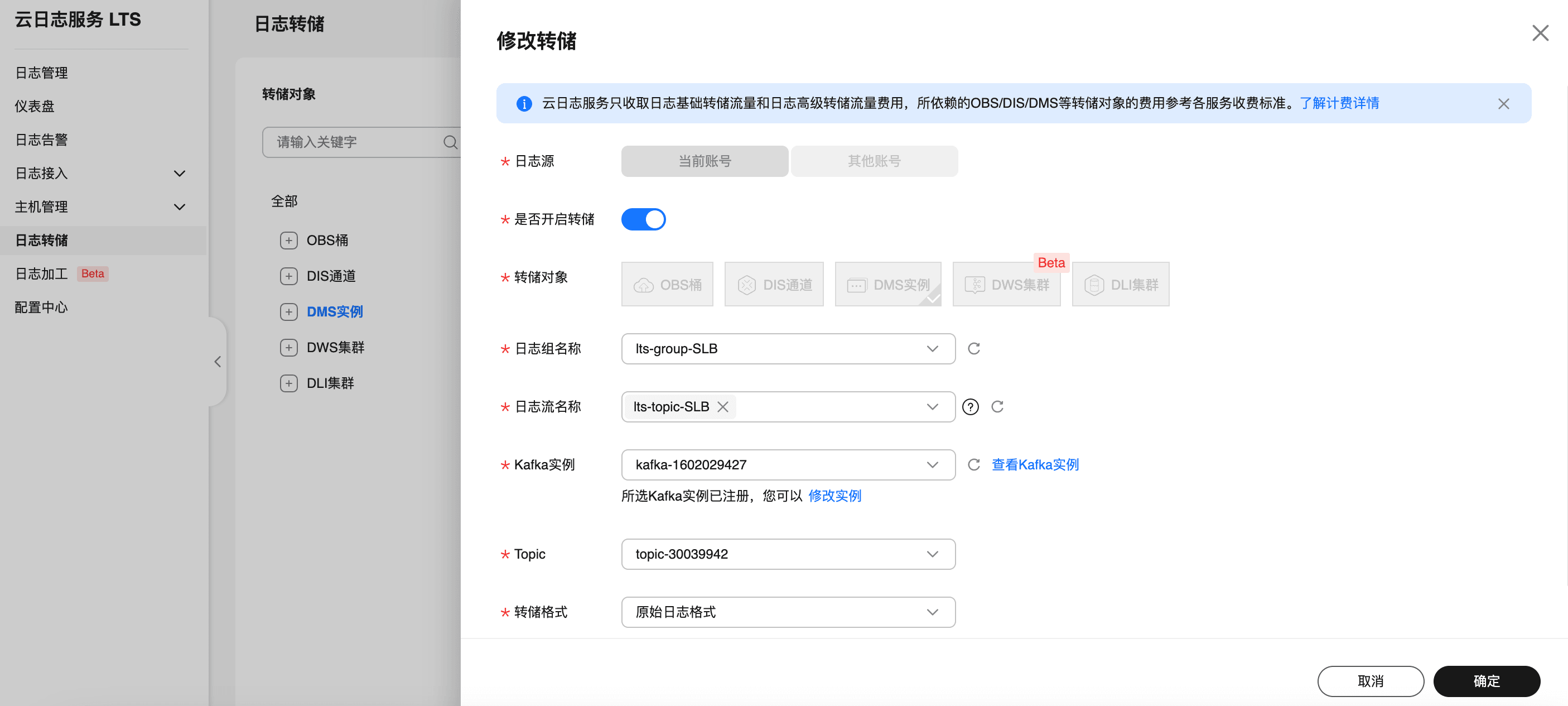
3、配置转储目标:选择 DMS 作为转储对象,并设置实施转储,设置要转储的日志组和日志流名称,以及 DMS 实例和 topic。
步骤 2:部署 DataKit
在需要采集的环境中(如 ECS),安装 DataKit。
# 需要把token 改成观测云空间的实际token值(可在观测云控制台-->集成-->Datakit 上面获取)
DK_DATAWAY="https://openway.guance.com?token=tkn_xxxxxx" bash -c "$(curl -L https://static.guance.com/datakit/install.sh)"
步骤 3:开启 KafkaMQ 采集器
进入 DataKit 安装目录下(默认是 /usr/local/datakit/conf.d/ )的 conf.d/kafkamq 目录,复制 kafkamq.conf.sample 并命名为 kafkamq.conf。类似如下:
-rwxr-xr-x 1 root root 2574 Apr 30 23:52 kafkamq.conf
-rwxr-xr-x 1 root root 2579 May  1 00:40 kafkamq.conf.sample
调整 kafkamq 采集器配置如下:
- addrs = ["192.168.0.106:9092"]。
- kafka_version = "3.0.0",该文使用 Kafka 的版本。
- [inputs.kafkamq.custom],删除注释符号“#”。
- [inputs.kafkamq.custom.log_topic_map],删除注释符号“#”。
- "topic-30039942"="topicSLB.p",topic-30039942 为 Topic 的名字,topicSLB.p为观测云 Pipeline 可编程数据处理器的日志字段提取规则配置。涉及的业务日志和 topicSLB.p 的内容详细见下面的《使用 Pipeline》。
- 其他一些配置说明:
- group_id = "datakit-group":消费者组名称,相同组内消费者共享分区消费进度。不同消费者组可独立消费同一主题
- assignor = "roundrobin":分区轮询分配给消费者,适合组内消费者订阅相同主题列表,实现负载均衡
# {"version": "1.81.1", "desc": "do NOT edit this line"}

[[inputs.kafkamq]]
  addrs = ["192.168.0.106:9092"]
  # your kafka version:0.8.2 ~ 3.2.0
  kafka_version = "3.0.0"
  group_id = "datakit-group"
  # consumer group partition assignment strategy (range, roundrobin, sticky)
  assignor = "roundrobin"

  ## rate limit.
  #limit_sec = 100
  ## sample
  # sampling_rate = 1.0

  ## kafka tls config
  # tls_enable = true
  ## PLAINTEXT/SASL_SSL/SASL_PLAINTEXT
  # tls_security_protocol = "SASL_PLAINTEXT"
  ## PLAIN/SCRAM-SHA-256/SCRAM-SHA-512/OAUTHBEARER,default is PLAIN.
  # tls_sasl_mechanism = "PLAIN"
  # tls_sasl_plain_username = "user"
  # tls_sasl_plain_password = "pw"
  ## If tls_security_protocol is SASL_SSL, then ssl_cert must be configured.
  # ssl_cert = "/path/to/host.cert"

  ## -1:Offset Newest, -2:Offset Oldest
  offsets=-1

  ## skywalking custom
  #[inputs.kafkamq.skywalking]
  ## Required: send to datakit skywalking input.
  #  dk_endpoint="http://localhost:9529"
  #  thread = 8
  #  topics = [
  #    "skywalking-metrics",
  #    "skywalking-profilings",
  #    "skywalking-segments",
  #    "skywalking-managements",
  #    "skywalking-meters",
  #    "skywalking-logging",
  #  ]
  #  namespace = ""

  ## Jaeger from kafka. Please make sure your Datakit Jaeger collector is open!
  #[inputs.kafkamq.jaeger]
  ## Required: ipv6 is "[::1]:9529"
  #  dk_endpoint="http://localhost:9529"
  #  thread = 8
  #  source: agent,otel,others...
  #  source = "agent"
  #  # Required: topics
  #  topics=["jaeger-spans","jaeger-my-spans"]

  ## user custom message with PL script.
  [inputs.kafkamq.custom]
    #spilt_json_body = true
    #thread = 8
    #storage_index = "" # NOTE: only working on logging collection

    ## spilt_topic_map determines whether to enable log splitting for specific topic based on the values in the spilt_topic_map[topic].
    #[inputs.kafkamq.custom.spilt_topic_map]
    #  "log_topic"=true
    #  "log01"=false
    [inputs.kafkamq.custom.log_topic_map]
      "topic-30039942"="topicSLB.p"
    #  "log01"="log_01.p"
    #[inputs.kafkamq.custom.metric_topic_map]
    #  "metric_topic"="metric.p"
    #  "metric01"="rum_apm.p"
    #[inputs.kafkamq.custom.rum_topic_map]
    #  "rum_topic"="rum_01.p"
    #  "rum_02"="rum_02.p"

  #[inputs.kafkamq.remote_handle]
    ## Required
    #endpoint="http://localhost:8080"
    ## Required topics
    #topics=["spans","my-spans"]
    # send_message_count = 100
    # debug = false
    # is_response_point = true
    # header_check = false

  ## Receive and consume OTEL data from kafka.
  #[inputs.kafkamq.otel]
    #dk_endpoint="http://localhost:9529"
    #trace_api="/otel/v1/traces"
    #metric_api="/otel/v1/metrics"
    #trace_topics=["trace1","trace2"]
    #metric_topics=["otel-metric","otel-metric1"]
    #thread = 8

  ## todo: add other input-mq
步骤 4:重启 DataKit 生效
datakit service -R
步骤 5:在观测云验证日志接入
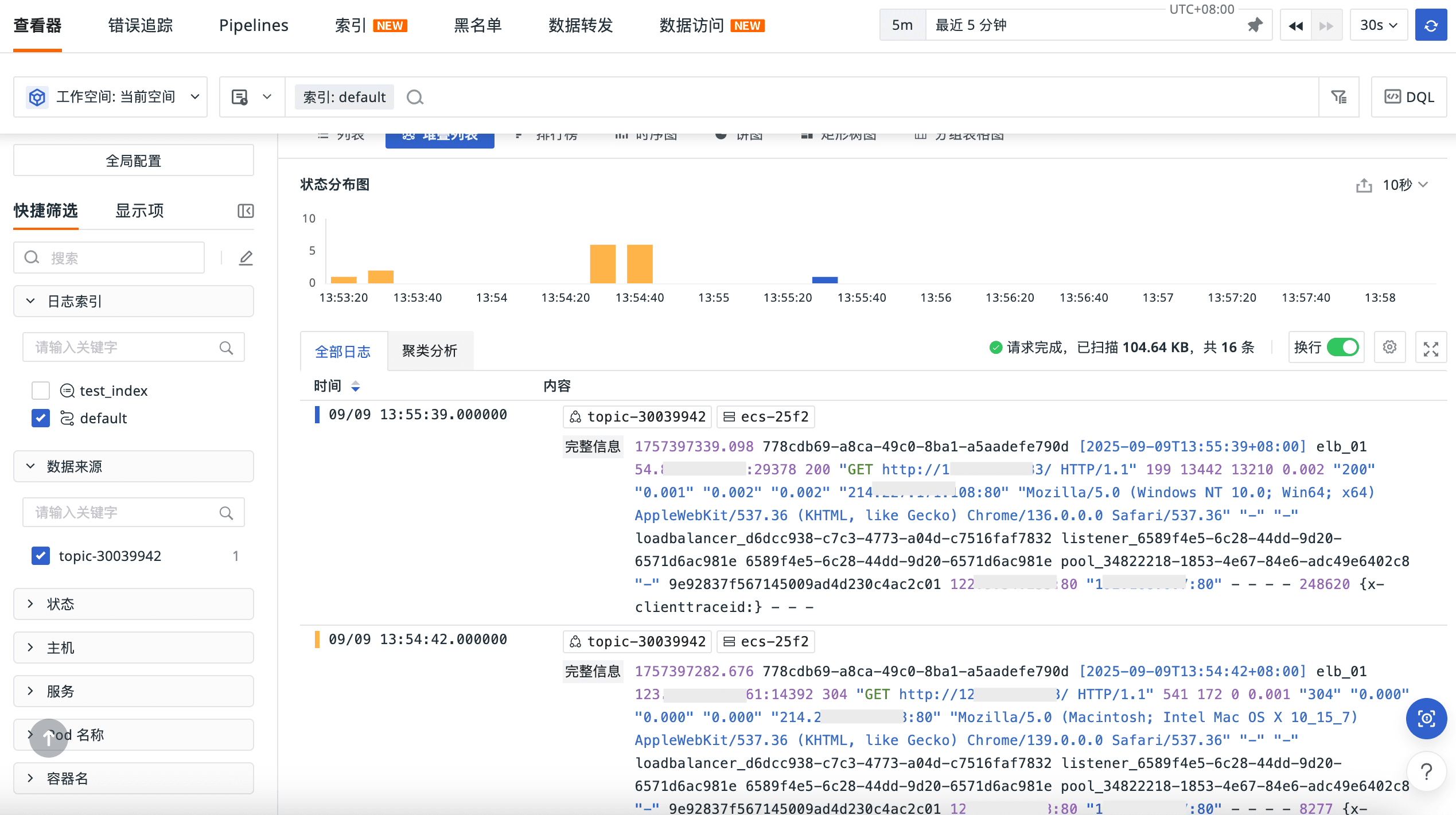
1、登录观测云控制台 → 日志查看器 ,可以看到相关日志已经被采集到了观测云。
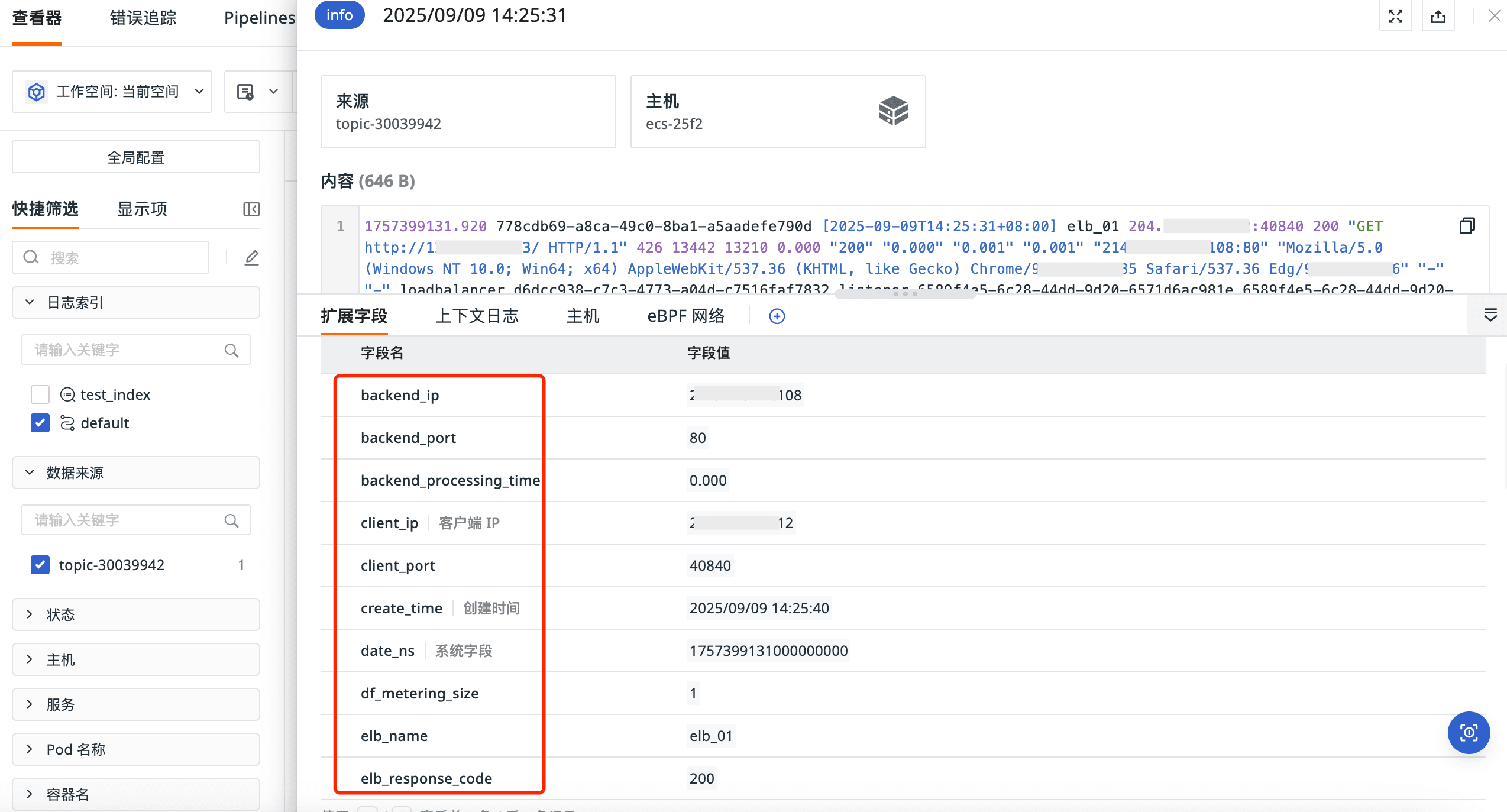
2、日志文本的字段已经被提取。
Get a tailored plan
Contact us
Join the community

Scan with WeChat
to join the community
to join the community
Try Guance
Start online and pay only for what you use.
Get startedChoose a Guance plan