


Prometheus remote_read: Configuration, Validation and Limits
Configure Prometheus Remote Read, verify real query results, diagnose missing series and timeouts, and distinguish it from sending metrics to Guance with Remote Write.
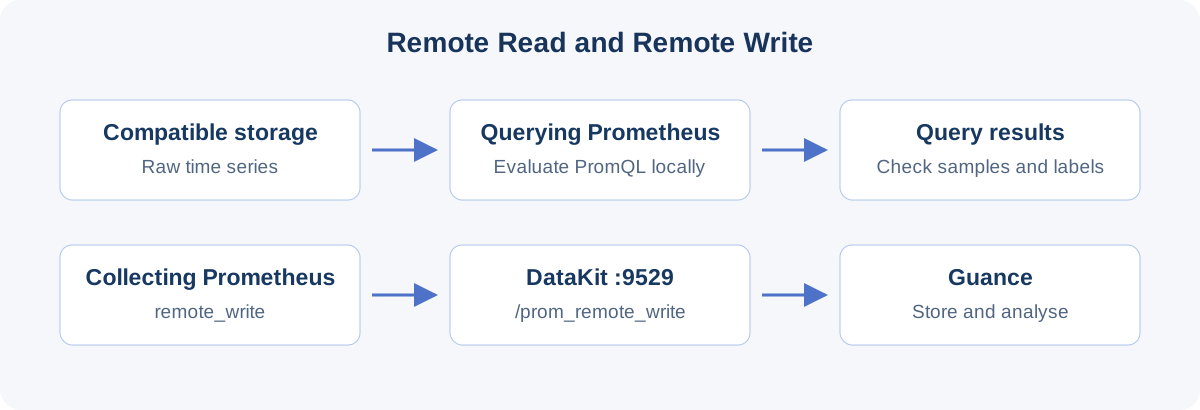
Prometheus remote_read lets one Prometheus server retrieve time series from another Prometheus server or compatible storage and include them in ordinary PromQL queries. It is a query path. remote_write sends ingested samples to an external receiver; the two settings solve different problems.
The Guance boundary matters here. The public Guance and TrueWatch documentation reviewed on 27 October 2026 describes DataKit's /prom_remote_write receiver and querying stored metrics with DQL or PromQL. It does not establish a Guance-managed Remote Read URL, authentication model or compatibility contract. That is a documentation gap, not proof that no deployment offers the capability. Do not put /prom_remote_write or DataKit's /v1/query/raw into remote_read.url.
This guide explains reading from another Prometheus server or a storage system with documented Remote Read support. For sending Prometheus metrics to Guance, use the Remote Write section below. The configuration has been checked against official documentation; the complete version-specific data path, authentication and rollback have not been exercised in this review.
What Remote Read actually does
Prometheus requests raw series for a set of label matchers and a time range, then evaluates PromQL locally. It does not send an arbitrary PromQL expression to the other system for distributed evaluation. A backend exposing /api/v1/query therefore does not necessarily support Remote Read.
This is useful for querying data older than local retention, consulting an old Prometheus instance during a migration, or reading a storage system through a protocol adapter. It does not automatically backfill the local TSDB, replicate the remote dataset or move that dataset into Guance. A series returned by a query has not thereby been permanently copied.
| Interface | Direction and job | Relevant boundary |
|---|---|---|
remote_read |
Remote storage → querying Prometheus | Requires a compatible Remote Read endpoint |
remote_write |
Prometheus → receiver | DataKit documents http://<datakit-ip>:9529/prom_remote_write |
| Prometheus HTTP API | Client → Prometheus, for PromQL evaluation | /api/v1/query and /api/v1/query_range return query results |
| DataKit Query API | Client → DataKit, for workspace DQL queries | /v1/query/raw does not implement the Remote Read wire protocol |
If you want to query third-party storage, obtain that vendor's supported Remote Read URL. If you want to store and analyse Prometheus metrics in Guance, configure DataKit Remote Write. If you want Prometheus to read Guance-held metrics, obtain the applicable product documentation before choosing an endpoint.
Keep the read and write paths separate
The client queries the local PromQL API. The querying Prometheus retrieves the necessary remote series and performs aggregation, rates and joins itself. On the Guance path, locally ingested samples go through remote_write to DataKit and then to the workspace.
Both settings can coexist in one configuration. That does not mean Remote Read results are automatically forwarded by Remote Write. Treat collection, querying, recording rules and export as separate paths when validating the design.
What has been verified
The review on 27 October 2026 confirmed the current remote_read configuration schema, the /api/v1/read protocol interface, DataKit's write receiver and DQL query API, and the product's PromQL query mode. It did not establish a public Guance Remote Read contract or execute the reader's binary combination.
Prometheus explicitly treats Remote Read as outside its stable API: changes can occur between non-major releases. Record the precise querying-server and storage/adapter versions, supported response types, authentication and limits. “Prometheus compatible” is not enough to establish that a particular data path works.
Before production use, validate requests, authentication, query results, timeouts and rollback against the versions you actually run. Documentation review cannot substitute for those checks.
Establish the endpoint contract first
The remote storage or adapter documentation should specify:
- A Remote Read URL. Prometheus itself exposes
/api/v1/read. - Snappy-compressed Protocol Buffers requests and compatible responses.
- Supported response types, including
SAMPLESorSTREAMED_XOR_CHUNKSas applicable. - TLS, authentication, tenant headers and certificate server name.
- Retention, query-range, series/sample, timeout and rate limits.
- Treatment of native histograms, stale markers and external labels.
Opening the URL in a browser proves very little. Remote Read uses binary Protocol Buffers requests sent by POST, not a hand-written JSON query. Neither a GET error nor a GET 200 establishes compatibility.
For the first test, use a source Prometheus that already contains a known metric and a separate querying Prometheus that does not scrape the same series locally. Start with one metric, one job and roughly five minutes of data.
A minimal configuration
The DNS name below is illustrative. Replace it with the actual private source address. The source must already hold up{job="prometheus"} for the test period, and the querying server must not collect that series locally.
global:
  scrape_interval: 30s

remote_read:
  - name: "jp_archive_validation"
    url: "http://prometheus-archive.monitoring.svc:9090/api/v1/read"
    remote_timeout: 30s
    read_recent: true
    filter_external_labels: false
name distinguishes the remote configuration in logs and metrics. remote_timeout defaults to 1m; this isolated example uses 30s to bound the wait. Choose production values from series counts, latency and remote limits, not by continually increasing the timeout.
read_recent: true allows this test to query recent remote data. Production installations that divide recent local data from historical remote data may need the default false.
filter_external_labels: false removes the querying server's external-label filtering from this initial experiment. It is not a tenancy or security recommendation. Revisit the label contract before enabling a production path.
Use file-backed credentials and TLS
Remote Read accepts Prometheus's common HTTP-client configuration. For a networked endpoint, configure supported authentication and certificate verification rather than embedding secrets in the article or disabling TLS checks.
remote_read:
  - name: "jp_archive_secure"
    url: "https://prometheus-archive.internal.example/api/v1/read"
    remote_timeout: 30s
    read_recent: false
    filter_external_labels: false
    authorization:
      type: "Bearer"
      credentials_file: "/etc/prometheus/secrets/remote-read.token"
    tls_config:
      ca_file: "/etc/prometheus/tls/remote-read-ca.crt"
      server_name: "prometheus-archive.internal.example"
      min_version: "TLS12"
Restrict credential and private-key file access to the process that needs them. Keep secrets out of support bundles, exported configuration and uncontrolled backups. Do not routinely set insecure_skip_verify: true. Use supported authorization, basic_auth, oauth2 or mutual TLS as appropriate, with file-based secrets where available.
A query can consume considerable server resources. Protect the endpoint with network controls, TLS and an appropriate authentication/authorization design. required_matchers controls client-side routing; it is not server-side access control.
Validate the configuration, then reload
Use promtool from the same version as the running server:
promtool check config /etc/prometheus/prometheus.yml
Passing confirms configuration validity within the tool's checks. It does not establish DNS, credentials, protocol compatibility, data existence or acceptable performance. Correct errors before reloading.
Where the existing deployment enables --web.enable-lifecycle, the management API accepts POST or PUT to /-/reload:
curl --fail --silent --show-error -X POST \
  http://127.0.0.1:9090/-/reload

curl --fail --silent --show-error \
  http://127.0.0.1:9090/-/ready
If that endpoint is disabled, use the deployment's established SIGHUP, Operator, service-manager or rollout procedure. Do not widen public access just to enable reload. A ready response means Prometheus can serve traffic; it does not validate Remote Read results.
Test through the ordinary PromQL API
Query the querying Prometheus rather than posting improvised JSON to /api/v1/read. Replace the example timestamps with a five-minute window for which the source actually holds the metric.
curl --fail --silent --show-error --get \
  'http://127.0.0.1:9090/api/v1/query_range' \
  --data-urlencode 'query=up{job="prometheus"}' \
  --data-urlencode 'start=2026-08-01T00:00:00Z' \
  --data-urlencode 'end=2026-08-01T00:05:00Z' \
  --data-urlencode 'step=30s' \
  --data-urlencode 'timeout=25s'
A successful range query returns a matrix. This is a reduced example of the response shape, not a recorded test result:
{
  "status": "success",
  "data": {
    "resultType": "matrix",
    "result": [
      {
        "metric": {
          "__name__": "up",
          "job": "prometheus"
        },
        "values": [
          [1785542400, "1"]
        ]
      }
    ]
  }
}
status: "success" can accompany an empty result. Verify actual samples, not just the HTTP response:
- Establish that the queried series is absent from the querying server's local scrape path.
- Run the same expression and time window against the source. Compare names, expected labels, timestamps and values, allowing for the documented external-label transformation.
- Confirm at least one expected series and sample.
- In the isolated test only, use a deliberately invalid remote URL or block that test connection. The remote-only query should fail or become empty.
- Redact tenant identifiers, secrets and private URLs before sharing evidence.
If local and remote storage both contain the series, an apparently successful query can hide a broken remote path. Use a distinct instance or historical interval. Never intentionally interrupt a production path for this negative control.
Diagnose empty or incomplete results
| Symptom | Check first | Then isolate |
|---|---|---|
| Empty result | Metric, labels and time range exist at the source | Retention, timezone, lookback, selector and read_recent |
| Only recent data is missing | read_recent defaults to false |
Test true in isolation, then define the production boundary |
| One cluster is missing | external_labels and filter_external_labels |
Compare actual remote labels with added matchers |
| Some selectors never query the remote | required_matchers |
Include the required equality matcher |
| Timeout | Remote, query-API and server timeouts | Narrow range/series; inspect remote limits and network |
| 404, 405 or 415 | Path, method, protocol and proxy rewrites | Exclude PromQL JSON and Remote Write URLs |
| Decode or protobuf error | Versions and response types | Consult the adapter's compatibility documentation |
| Values arrive under different labels | External labels and adapter transformations | Compare one known series end to end |
Remote Read protocol timestamps use milliseconds. The PromQL HTTP API accepts RFC3339 or Unix timestamps. Keep the UI's local timezone distinct from the UTC interval in the request. Remote Read does not fill absent samples or turn a failed scrape into a successful one.
Separate DNS, TLS handshake, proxies, service mesh and network policy when checking connectivity. TCP success is not a protocol compatibility test; a real Prometheus query and expected samples are the final check.
Three options that often explain missing data
read_recent defaults to false. It controls whether remote storage is queried for intervals that local storage is expected to cover completely. Setting it to true for every overlapping interval can add latency and load; select it deliberately.
filter_external_labels defaults to true. The querying server can send its external labels as extra equality matchers and remove its added labels from the response. A serving Prometheus also adds its own external labels to Remote Read responses without storing them in the TSDB. Direct source PromQL results and Remote Read results therefore need not have identical label sets. Mismatched labels can filter out the series entirely.
required_matchers only selects an endpoint when the query contains the configured equality matcher. Use the following only if the remote series really carry archive="jp-prod":
remote_read:
  - name: "jp_prod_archive"
    url: "https://prometheus-archive.internal.example/api/v1/read"
    required_matchers:
      archive: "jp-prod"
http_requests_total{archive="jp-prod",job="api"} can select this endpoint; http_requests_total{job="api"} cannot. Choose a stable, low-cardinality label rather than a user or request identifier. This routing condition is not authorization.
Control query size before increasing timeouts
The querying server must receive and process the raw data. A broad selector such as {__name__=~".+"}, a long interval and high-cardinality labels can stress remote storage, network, CPU and memory together. Streaming does not make unbounded queries safe.
Start with one metric and narrow job, cluster or service matchers. Expand from five minutes to one hour and then six hours, recording series/sample counts, response size, remote latency and the querying server's resources. Reproduce real dashboard, alert and recording-rule expressions individually. Check user-visible timeout errors and whether retries amplify load.
remote_timeout, the query API's timeout, the server query timeout, reverse-proxy timeouts and storage limits are separate. The shortest applicable deadline wins. Raising one timeout does not repair an overly broad selector.
The same cardinality discipline matters when storing metrics in Guance: avoid unbounded user_id, request IDs and full URLs as labels. Storage design and Remote Read performance remain separate evaluations.
Treat protocol compatibility as a versioned property
Remote Read uses Snappy-compressed Protocol Buffers requests over HTTP. Prometheus exposes /api/v1/read and documents sample and streamed-chunk responses. Streaming divides large responses into frames; both endpoints must support the negotiated response type.
Record exact client and storage/adapter builds, endpoint, TLS, tenant routing and credentials; support for SAMPLES and STREAMED_XOR_CHUNKS; float samples, native histograms and stale markers; frame, series, sample, range and concurrency limits; and failure statuses/logs.
After an upgrade, repeat representative queries for a float metric, histograms if used, a missing-data interval and a timeout. “Prometheus 3 support” or “supports PromQL” is too broad to replace this check.
To send metrics to Guance, use Remote Write
Enable DataKit's Prometheus Remote Write collector and configure Prometheus in the sending direction:
remote_write:
  - url: "http://datakit.monitoring.svc:9529/prom_remote_write"
Manage a prom_remote_write.conf copied from the supplied sample and confirm path = "/prom_remote_write". Restrict network access and assess TLS termination, authentication, filtering and tags. The collector documentation includes Basic Auth settings; do not copy actual credentials into an article or ticket.
Metrics Analysis provides PromQL for metrics stored in the product. That is different from exposing a Remote Read server to external Prometheus instances.
Fix job_as_measurement, measurement_name, keep_exist_metric_name and tag-filter/rename settings during evaluation. Compare names and real query results before and after ingestion. HTTP 2xx from the receiver does not establish dashboard or alert compatibility.
Roll back only this change
Keep the Remote Read entry in a separate change from unrelated configuration:
- Retain the original configuration, versions, endpoint, credential-file references and external labels.
- Remove only the target
remote_readentry or restore its prior value. - Run
promtool check config /etc/prometheus/prometheus.yml. - Reload or roll out through the established procedure.
- Check
/-/ready, known local queries and alerts. - Confirm that the remote-only control query no longer returns data through this entry.
- Retire test credentials, network exceptions and debug logs through the normal process.
Removing Remote Read does not delete the remote data. Nor has querying permanently migrated that data locally. If Remote Write to Guance is also configured, leave it outside this rollback unless its separate change plan requires otherwise.
Decide whether the path is ready for production
Use an evaluation window that includes representative dashboards, alerts and ad-hoc queries. Require documented version compatibility, expected sample/label results, deliberate option choices, failure and timeout behavior, acceptable load at realistic cardinality, tested credential/TLS rotation, tenancy boundaries and a successful rollback exercise. Evaluate Guance metric naming and export volume independently if Remote Write is also used.
One visible series, an HTTP 200 or a valid PromQL expression is not enough. Remote Read introduces another dependency into query availability; its outage can affect dashboards and alert evaluation.
Which questions still need evidence
The protocol direction, defaults and local PromQL evaluation are documented facts. The remaining questions fall into different categories:
- Product documentation: a Guance-managed Remote Read endpoint, supported protocol, authentication, tenancy and limits have not been established by the reviewed public references. Obtain this contract before implementing such a path.
- Deployment testing: exact binary compatibility, native histograms, streamed chunks, stale markers, real cardinality, retention, latency, timeouts and dashboard/alert/rule equivalence need the actual environment.
- Account terms: SLA, storage, processing and backup locations require the applicable contract. An endpoint's regional name or a successful query does not establish data residency.
This guide does not claim universal compatibility, unlimited queries, lossless migration or zero downtime. Those conclusions would require evidence beyond documentation review.
Official sources
Configuration and protocol claims were rechecked on 27 October 2026:
- Prometheus storage and glossary: read/write direction, raw series and local evaluation.
- Configuration reference: Remote Read options, defaults and HTTP authentication/TLS.
- Remote Read API: endpoint, stability, response types and external labels.
- HTTP API: range queries, timestamps and result shape.
- Management API and promtool reference: validation and reload.
- Security model and Remote Read streaming: endpoint exposure, query load and streaming design.
- TrueWatch Remote Write and Guance Remote Write: receiver configuration and naming.
- TrueWatch metrics and Metrics Analysis: stored metrics and product PromQL.
- DataKit HTTP API: workspace DQL querying and its distinction from Remote Read.
Contact us
Join the community

to join the community
Try Guance
Start online and pay only for what you use.
Get startedChoose a Guance plan