观测云可用性 SLO 之跨多空间年度汇总统计
本实践介绍如何通过观测云函数计算平台(DataFlux Func)来处理各个空间的数据,并生成综合的 SLO 数据。

应用场景
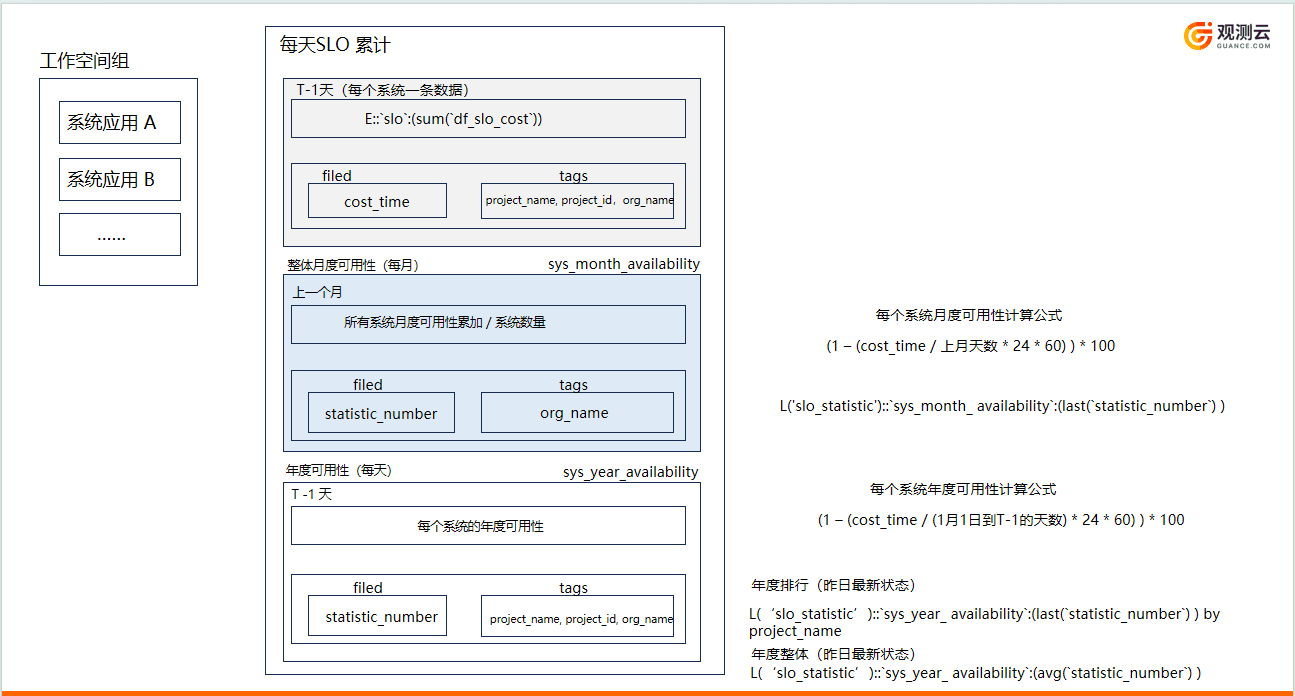
当企业内部多个部门的业务系统将可观测数据上报至观测云平台的不同租户空间时,标准服务水平协议(SLO)仅能针对单个租户空间进行数据统计。为了在统一的租户空间中汇总并计算业务系统的总体可用性,需要利用函数计算平台(func平台)来处理各个空间的数据,并生成综合的 SLO 数据。
前提条件
- 每个租户空间已设置 SLO 监控项目
- DataFlux Func 平台已部署(以下统一称 func)
- 新建统一展示的租户空间
1. 定义指标集、指标、以及标签
SLO 将新生成以下三种数据:
1)每天的SLO统计:
- 数据类型:logging 日志
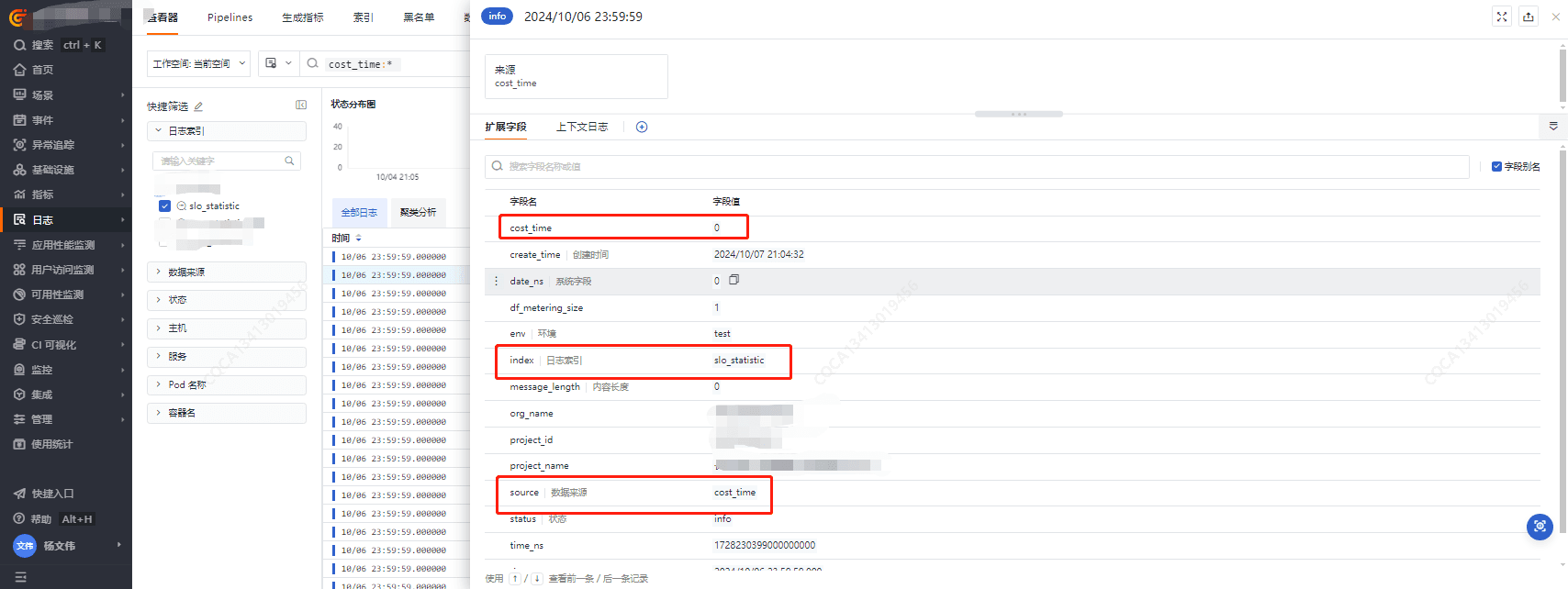
- 索引名称:slo_statistic
- 数据源名称:slo_statistic
- 标签:cost_time,project_name,project_id,org_name
2)月度的SLO统计:
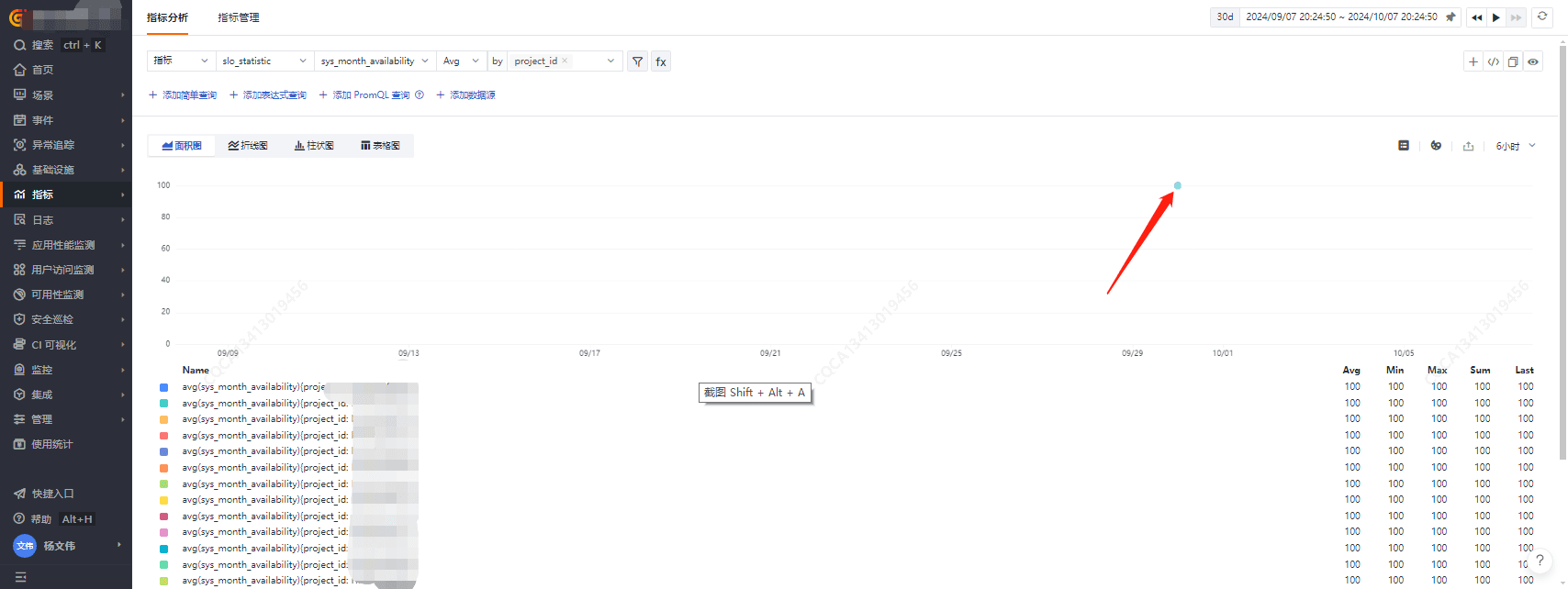
- 数据类型:Metric 指标
- 指标集:slo_statistic
- 指标:sys_month_ availability
- 标签:project_name,project_id,org_name
3)年度的SLO统计:
- 数据类型:logging 日志
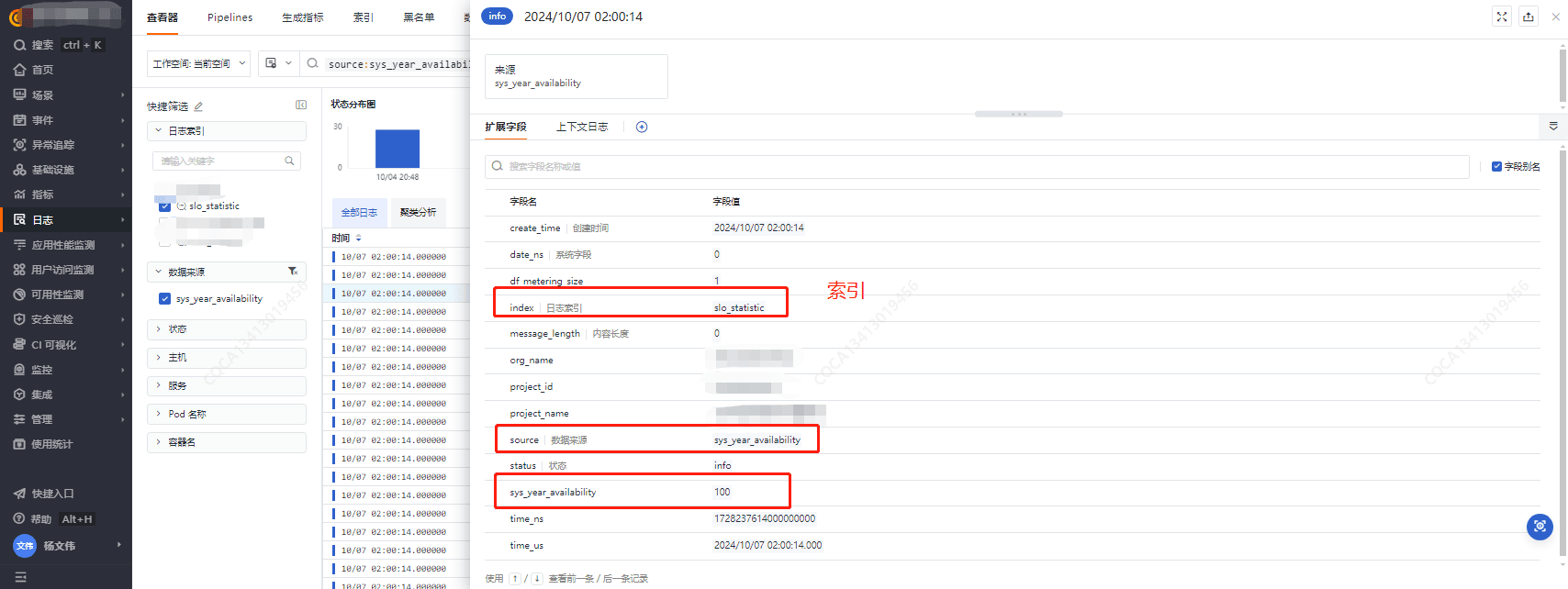
- 索引名称:slo_statistic
- 数据源名称:sys_year_availability
- 标签:sys_year_availability,project_name,project_id,org_name
2. SLO 处理脚本编写
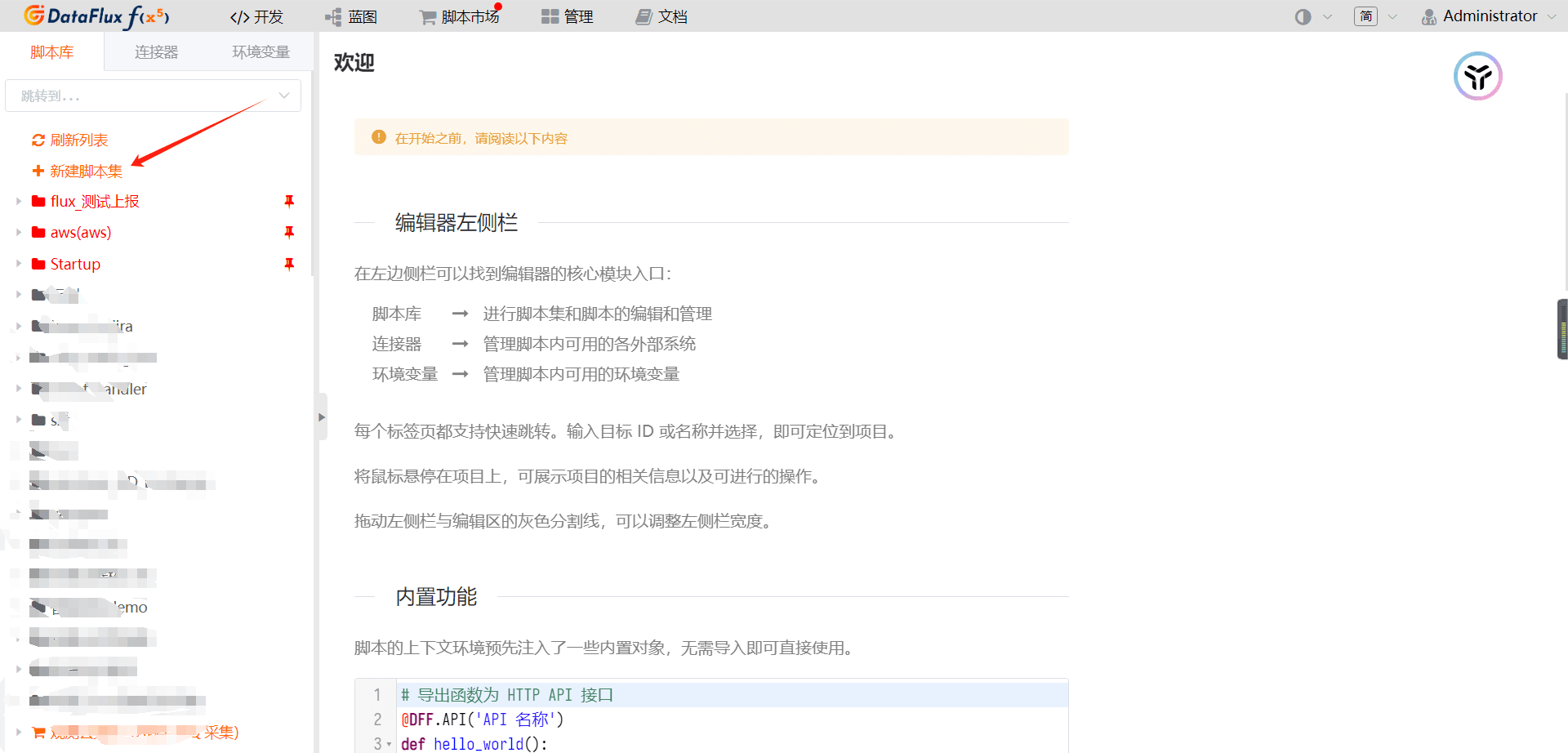
登录 func 平台
- 新建脚本集
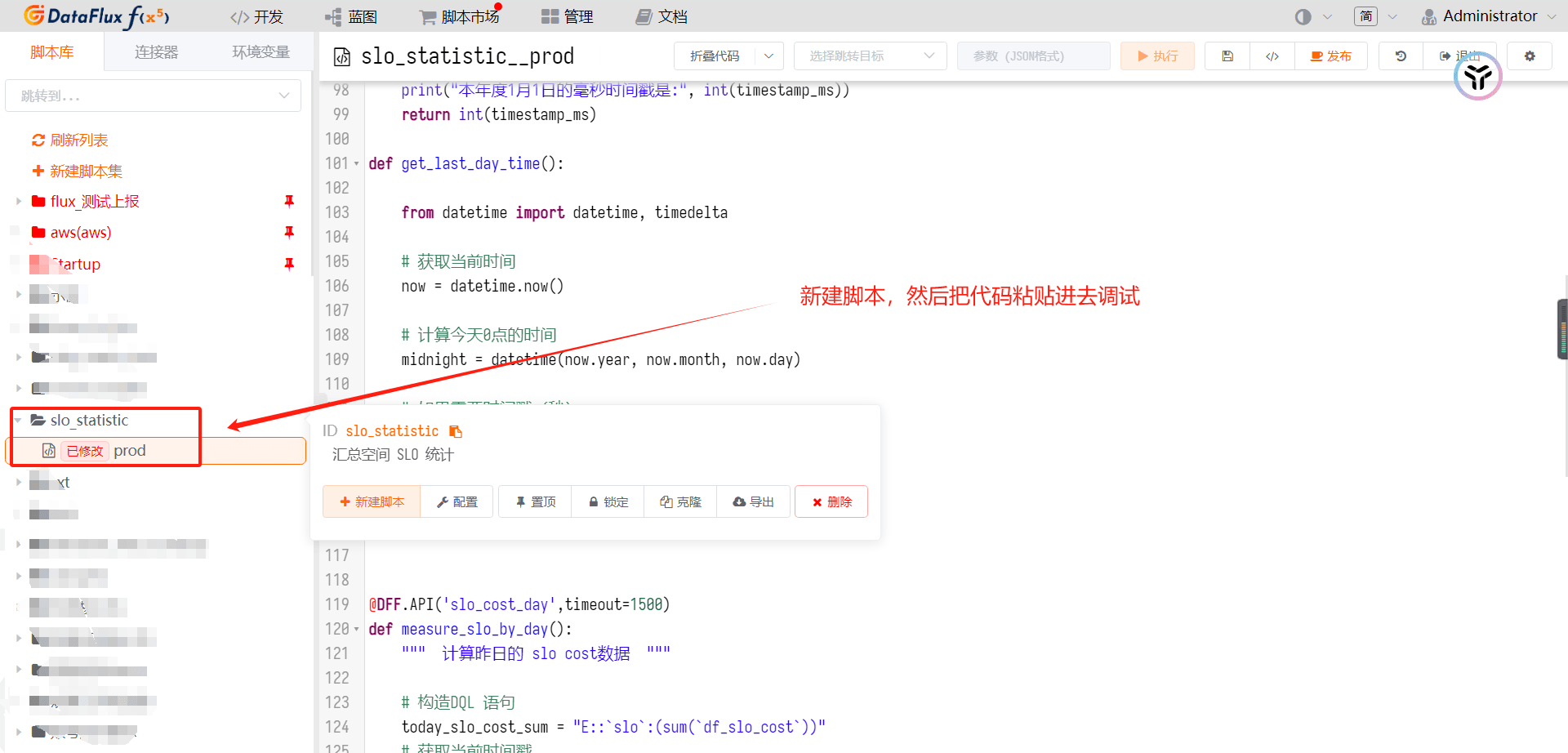
- 新建脚本
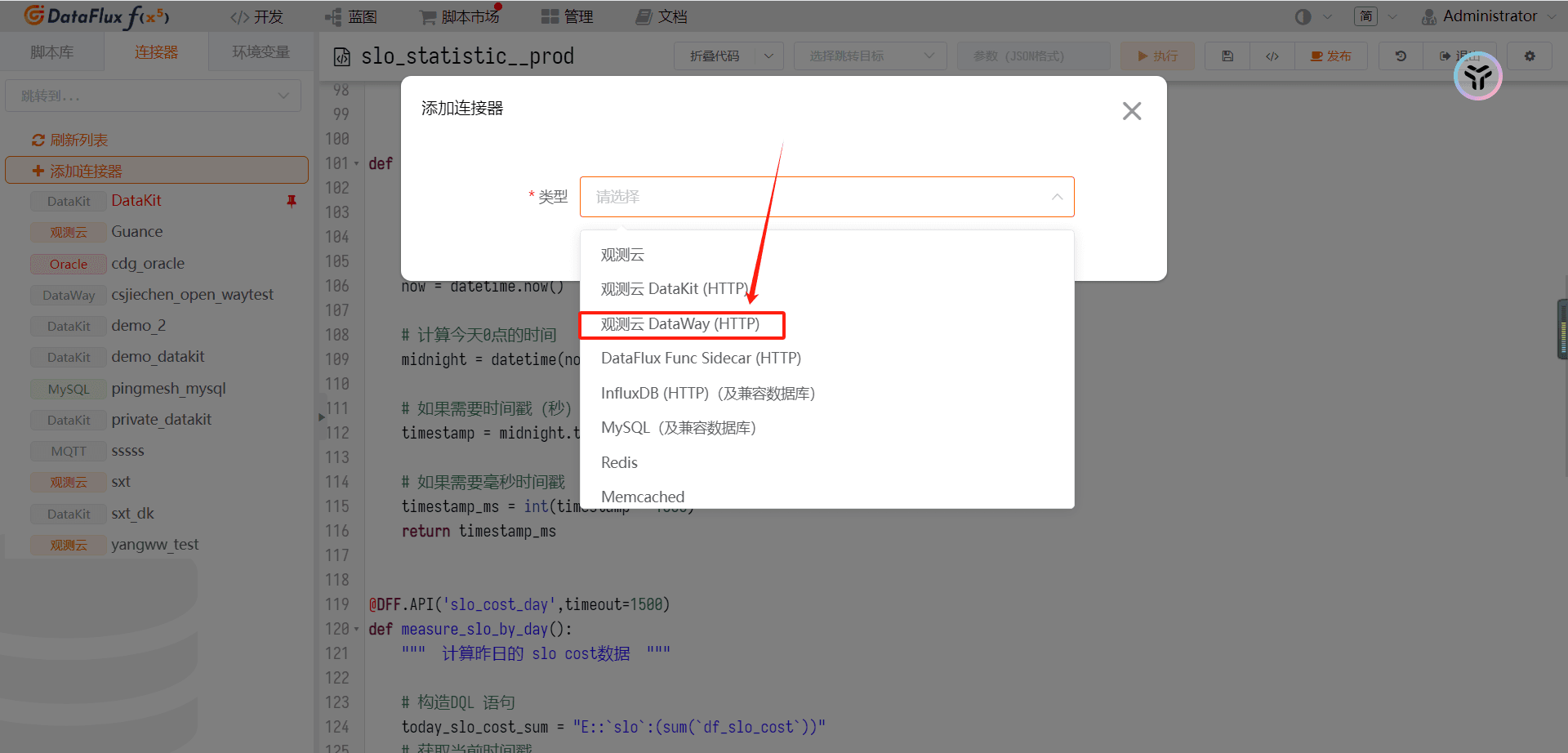
- 新建 dataway 连接器
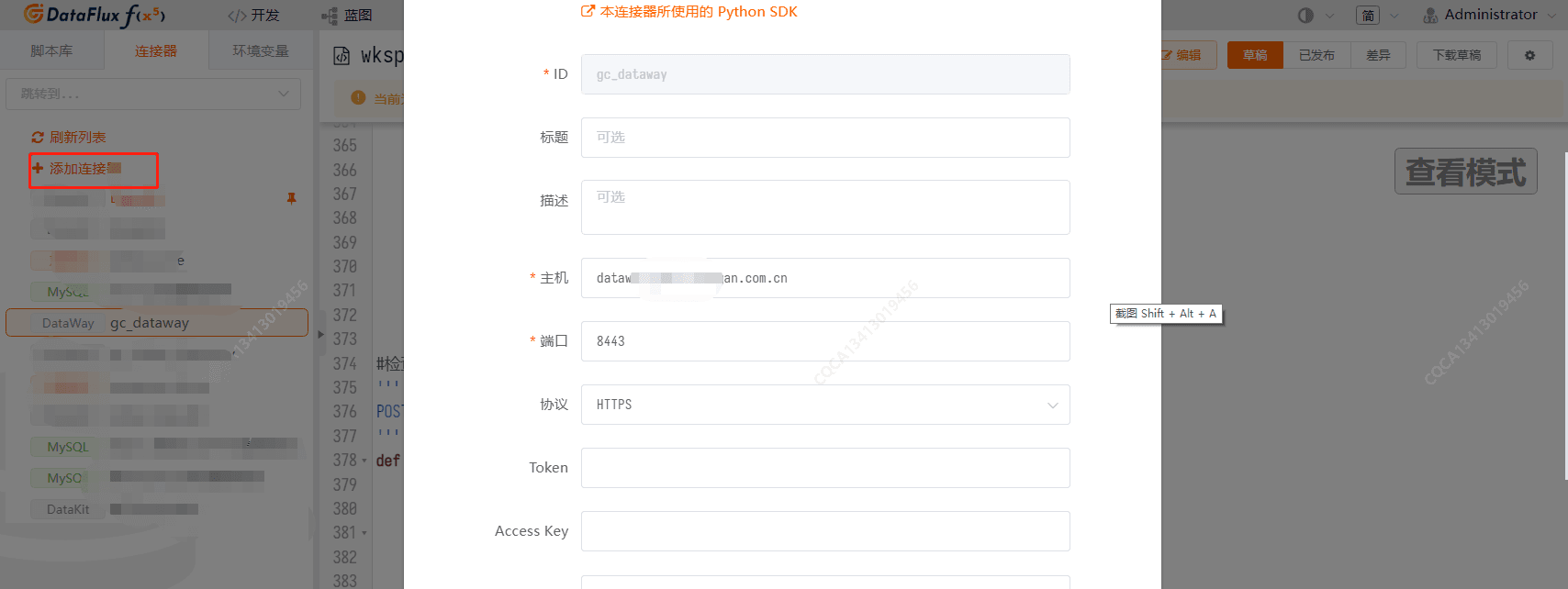
如下为 SLO 处理的执行脚本:
import time
import datetime
import requests
import json

OPEN_API_BASE_URL = DFF.ENV('OPEN_API_URL')

# 注意,此方法是获取工作空间列表的,如果空间不多的情况,可手动收集 空间 token、空间名称等信息。
def get_workspace_list():
    """ 可手动构造workspace空间信息,也可以通过openapi 调用接口获取 """
    #import wksp_automation__main as wksp_token
    #response = wksp_token.gc_get_all_wksp_token_list()
        response = [
        {"wksp_name": "业务空间1", "wksp_token":"t5t55oken_xxxxxxx","sys_no": "project_id_xxxx"},
        {"wksp_name": "业务空间2", "wksp_token":"t5t55oken_xxxxxxx","sys_no": "project_id_xxxx"},
        {"wksp_name": "业务空间3", "wksp_token":"t5t55oken_xxxxxxx","sys_no": "project_id_xxxx"}

        ]


    return response


def get_rum_application_list_by_wksp_key(wksp_key):
    url = OPEN_API_BASE_URL + '/api/v1/rum_cfg/quick_list'
    params = {
        "appId": ""
    }
    headers = {
        "Content-Type": "application/json",
        "DF-API-KEY": wksp_key
    }
    response = requests.get(url, params=params, headers=headers)
    response = json.loads(response.text)
    return response["content"]

def get_last_mounth_first_day():


    from datetime import datetime, timedelta

    # 获取当前日期
    current_date = datetime.now()

    # 获取当前年份和月份
    year = current_date.year
    month = current_date.month

    # 如果当前是1月,则上个月是去年的12月
    if month == 1:
        year -= 1
        month = 12
    else:
        month -= 1

    # 创建上个月1号的datetime对象
    first_day_of_last_month = datetime(year, month, 1)

    # 将datetime对象转换为时间戳(秒)
    timestamp = first_day_of_last_month.timestamp()

    # 将时间戳转换为毫秒
    timestamp_milliseconds = int(timestamp * 1000)

    print("上个月1号的时间戳(毫秒)是:", timestamp_milliseconds)
    return timestamp_milliseconds

def get_last_mounth_last_day():


    from datetime import datetime, timedelta

    # 获取当前日期
    current_date = datetime.now()

    # 获取上个月的年份和月份
    if current_date.month == 1:
        last_month_year = current_date.year - 1
        last_month = 12
    else:
        last_month_year = current_date.year
        last_month = current_date.month

    # 获取上个月的最后一天
    last_day_of_last_month = datetime(last_month_year, last_month, 1) - timedelta(days=1)

    # 将datetime对象转换为时间戳(秒)
    timestamp = last_day_of_last_month.timestamp()

    # 将时间戳转换为毫秒
    timestamp_milliseconds = int(timestamp * 1000)

    print("上个月最后一天的时间戳(毫秒)是:", timestamp_milliseconds)
    return timestamp_milliseconds

def get_jour_1_day_time():
    from datetime import datetime, timedelta

    # 获取当前年份
    current_year = datetime.now().year

    # 创建本年度1月1日的datetime对象
    january_first = datetime(current_year, 1, 1)

    # 将datetime对象转换为毫秒时间戳
    timestamp_ms = january_first.timestamp() * 1000

    print("本年度1月1日的毫秒时间戳是:", int(timestamp_ms))
    return int(timestamp_ms)

def get_last_day_time():

    from datetime import datetime, timedelta

    # 获取当前时间
    now = datetime.now()

    # 计算今天0点的时间
    midnight = datetime(now.year, now.month, now.day)

    # 如果需要时间戳(秒)
    timestamp = midnight.timestamp()

    # 如果需要毫秒时间戳
    timestamp_ms = int(timestamp * 1000)
    return timestamp_ms


@DFF.API('slo_cost_day',timeout=1500)
def measure_slo_by_day():
    """  计算昨日的 slo cost数据  """

    # 构造DQL 语句
    today_slo_cost_sum = "E::`slo`:(sum(`df_slo_cost`))"
    # 获取当前时间戳
    current_time = time.localtime()

    today_date_start_timestamp = time.mktime((current_time.tm_year, current_time.tm_mon, current_time.tm_mday, 0, 0, 0, current_time.tm_wday, current_time.tm_yday, current_time.tm_isdst))
    # 获取昨天0点时间戳
    yesterday_start_timestamp = today_date_start_timestamp - 86400

    # 获取昨天23点59分59秒的时间戳
    yesterday_end_timestamp = today_date_start_timestamp - 1

    # 查询时间范围
    time_range = [int(yesterday_start_timestamp)*1000,int(yesterday_end_timestamp)*1000]

    # 查询所有命名空间的数据()
    # 如果无法查询到空间信息,则可以手动拼接多个空间的数组信息,提供给下面for循环遍历。
    all_workspace_list = get_workspace_list()

    central_dataway = DFF.CONN('gc_dataway', token="tkn_xxxxxxx")

    last_day_of_last_month_timestamp = get_last_mounth_last_day()

    # 构造上报数据的结构

    _tags = {}
    _fields = {}
    _measurement = "cost_time"
    for  workspace in all_workspace_list:
        # 遍历所有空间

        dataway = DFF.CONN('gc_dataway', token=workspace["wksp_token"])
        slo_status_code, slo_list = dataway.query(dql=today_slo_cost_sum,time_range=time_range)

        # 获取有slo cost 数据的空间
        if slo_list is not None and len(slo_list.get("series",[]))>0:
            cost_time = slo_list.get("series")[0].get("values")[0][1]
            _tags["project_name"] = workspace["wksp_name"]
            _tags["project_id"] = workspace["sys_no"]
            _tags["org_name"] = org_name
            _tags["env"] = "test"
            _tags["status"] = "info"
            _tags["source"] = "cost_time"
            _fields["cost_time"] = cost_time
            time_tmp = 1725119880000  # 临时时间戳
            # res = central_dataway.write_logging(measurement=_measurement, tags=_tags, fields=_fields, timestamp=yesterday_end_timestamp)
            res = central_dataway.write_logging(measurement=_measurement, tags=_tags, fields=_fields, timestamp=time_tmp)
            print(_measurement,_fields,last_day_of_last_month_timestamp)


@DFF.API('slo_by_mounth',timeout=1500)
def measure_slo_by_mounth():
    """ 计算月slo   """

    last_day_of_last_month_timestamp = get_last_mounth_last_day()
    first_day_of_last_month_timestamp = get_last_mounth_first_day()

    # 查询时间范围
    time_range = [first_day_of_last_month_timestamp,last_day_of_last_month_timestamp+86400000]

    mounth_slo_cost_dql = "L('slo_statistic')::`slo_statistic`:(sum(`cost_time`)){env = 'prod'} BY `env`,`project_name`,`project_id`"

    central_dataway = DFF.CONN('gc_dataway', token="tkn_xxxxx")

    # 获取各个服务上个月的slo cost 数据
    slo_status_code, slo_list = central_dataway.query(dql=mounth_slo_cost_dql,time_range=time_range)

    # 构造存储格式
    _tags = {}
    _measurement = "slo_statistic"
    _fields = {}
    print(slo_list)
    slo_list = slo_list.get("series",[])
    print(time_range,"查询时间戳")
    print(last_day_of_last_month_timestamp,"存储时间戳")
    print(slo_list)
    # 计算 月度 slo
    for slo in slo_list:
        _tags = slo.get("tags")
        _tags["status"] = "info"
        _tags["source"] = "info"
        _measurement = _measurement
        cost_time = slo.get("values")[0][1]

        total_time_min = (last_day_of_last_month_timestamp - first_day_of_last_month_timestamp)/60
        slo_sum =  (1- cost_time/total_time_min) * 100
        _fields["sys_month_availability"] = slo_sum
        status_code,res = central_dataway.write_logging(measurement=_measurement, tags=_tags, fields=_fields, timestamp=last_day_of_last_month_timestamp)
        status_code,res2 = central_dataway.write_metric(measurement=_measurement, tags=_tags, fields=_fields, timestamp=last_day_of_last_month_timestamp)
        print(_tags,_fields,_measurement,print,res)


@DFF.API('slo_by_year',timeout=1500)
def measure_slo_by_year():
    """ 计算年度slo  (1 – (cost_time / (1月1日到T-1的天数) * 24 * 60) ) * 100  """

    # 获取今年1月1号时间戳
    this_year_jan_1_timestamp = get_jour_1_day_time()

    # 获取昨天的时间戳
    last_day_time_timestamp = get_last_day_time()

    # 计算 1月1号 到昨天 的总时长 s转换成min
    this_yeaml_time_sum = (this_year_jan_1_timestamp - last_day_time_timestamp)/60

    _tags = {}
    _tags["status"] = "info"
    _tags["org_name"] = "IT新业务xxx"
    _measurement = "sys_year_availability"
    _fields = {}

    # 查询时间范围
    time_range = [this_year_jan_1_timestamp,last_day_time_timestamp]
    print(time_range)
    year_slo_cost_dql = "L('slo_statistic')::`slo_statistic`:(sum(`cost_time`)){env = 'prod'} BY `env`,`project_name`,`project_id`"

    central_dataway = DFF.CONN('gc_dataway', token="tkn_xxxxxx")

    # 获取各个服务上个月的slo cost 数据


    slo_status_code, slo_data = central_dataway.query(dql=year_slo_cost_dql,time_range=time_range)
   # print(slo_data)
    for data in slo_data.get("series","[]"):
        print(data)
        _fields["project_name"] = data.get("tags",{}).get("project_name")
        _fields["project_id"] = data.get("tags",{}).get("project_id")
        cost_time_year_by_project = data.get("values",[])[0][1]

        cost_time_slo = (1- cost_time_year_by_project / this_yeaml_time_sum)*100
        _fields["sys_year_availability"] = int(cost_time_slo)

        status_code,res = central_dataway.write_logging(measurement=_measurement, tags=_tags, fields=_fields, timestamp=time.time())
        print(_fields)
3. 配置定时任务执行脚本
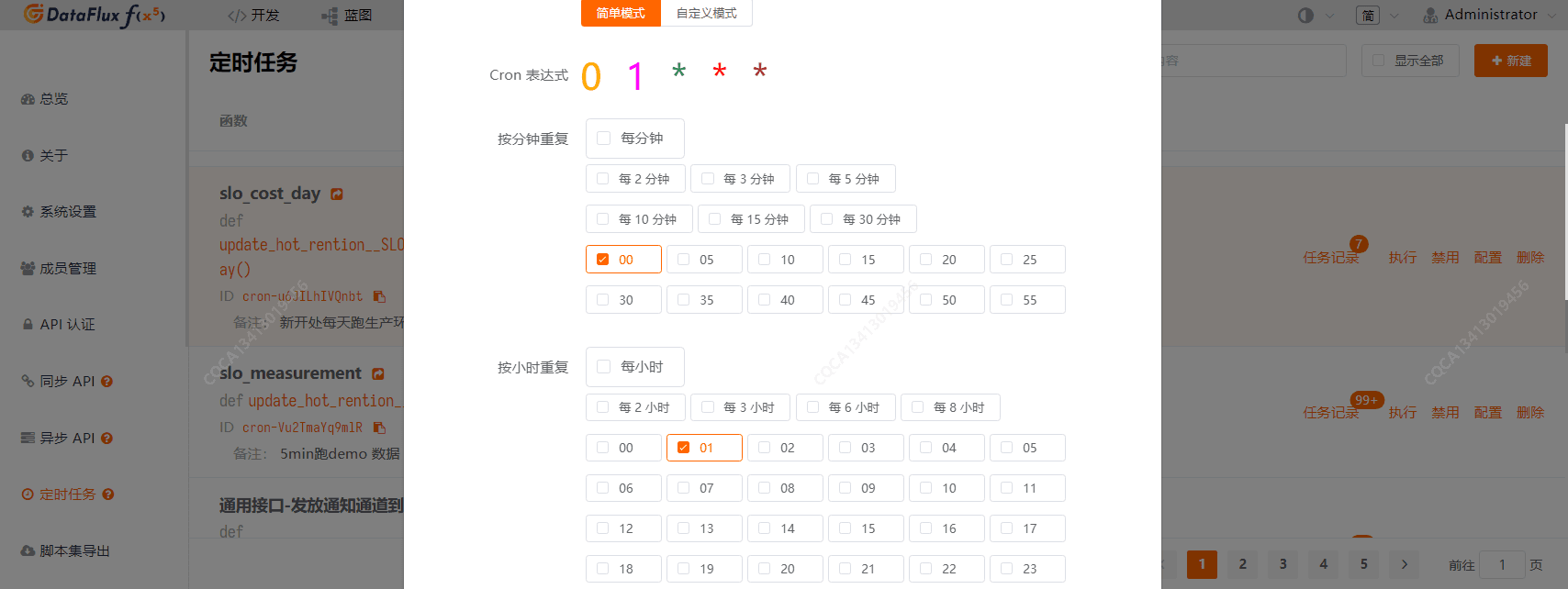
每天的 SLO 统计: 配置每天凌晨 1 点开始执行脚本。(每天执行一次)
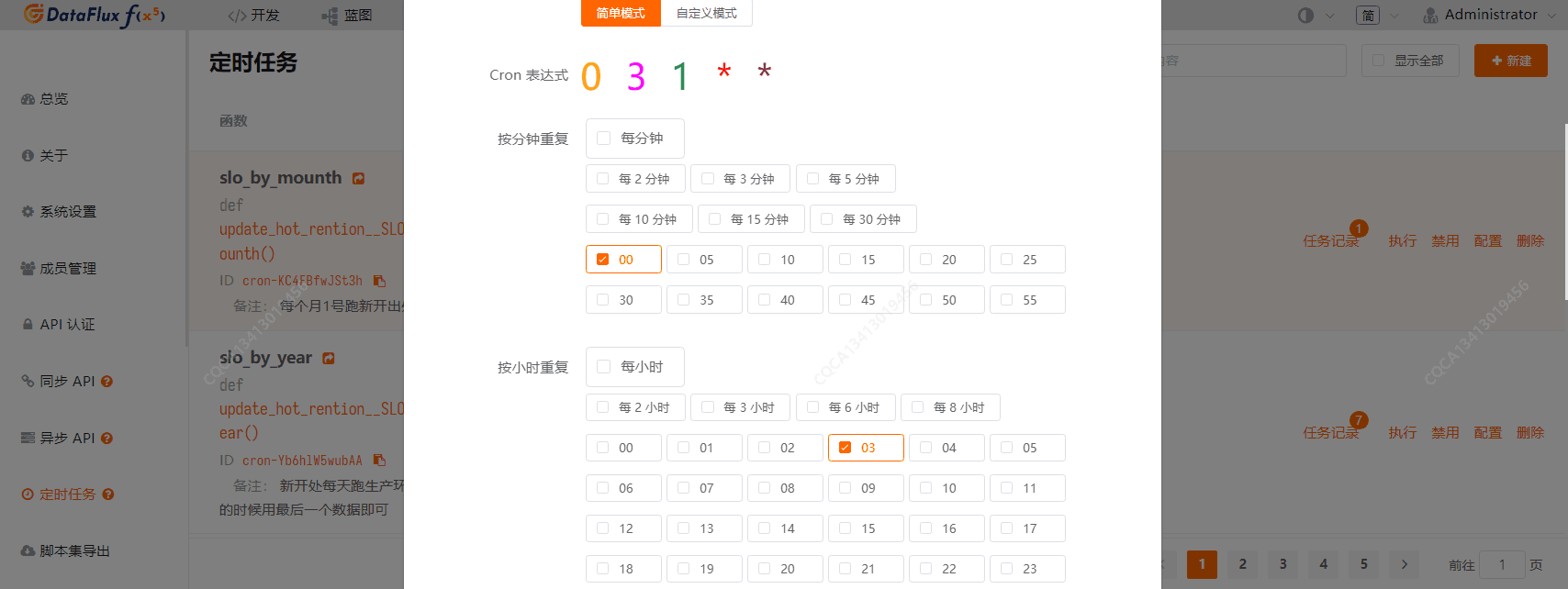
月度的 SLO 统计:配置每个月 1 号的凌晨 3 点开始执行脚本。(每月执行一次)
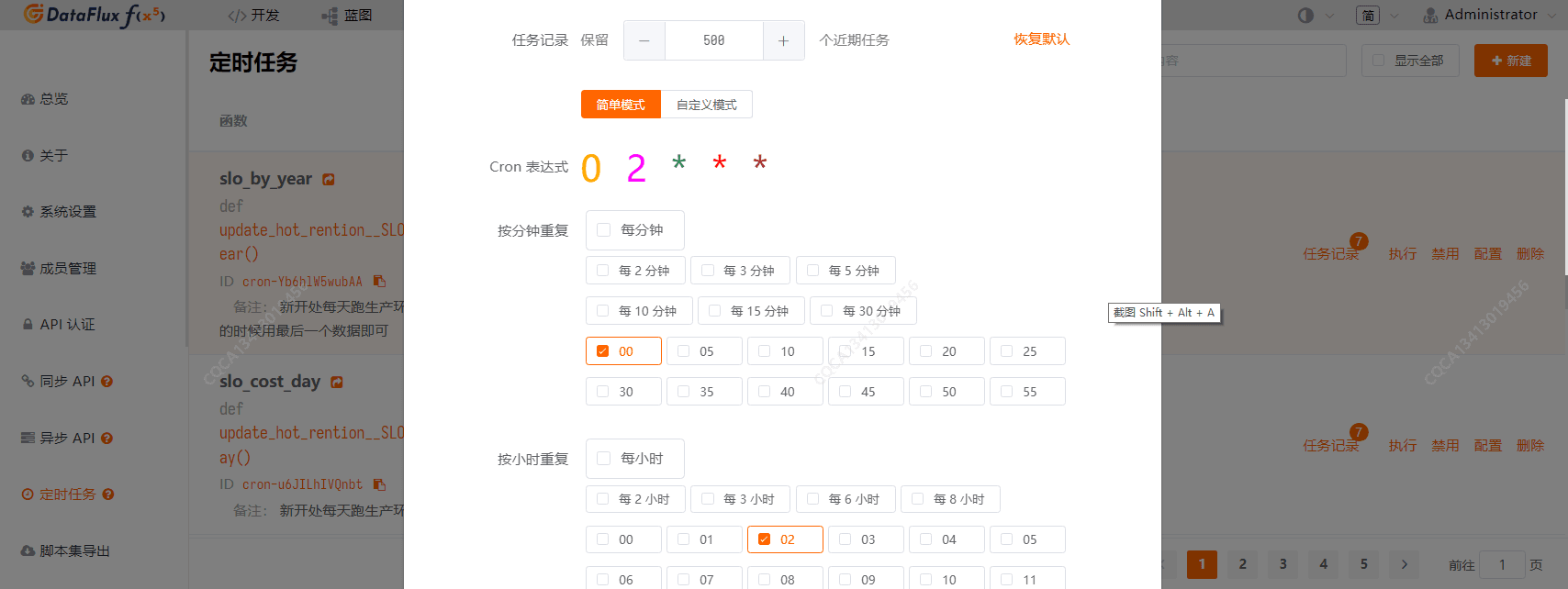
年度的 SLO 统计:每天的凌晨 2 点开始执行脚本
4. 数据验证
每天的 SLO 统计数据
每月的 SLO 统计数据
年度的 SLO 统计数据
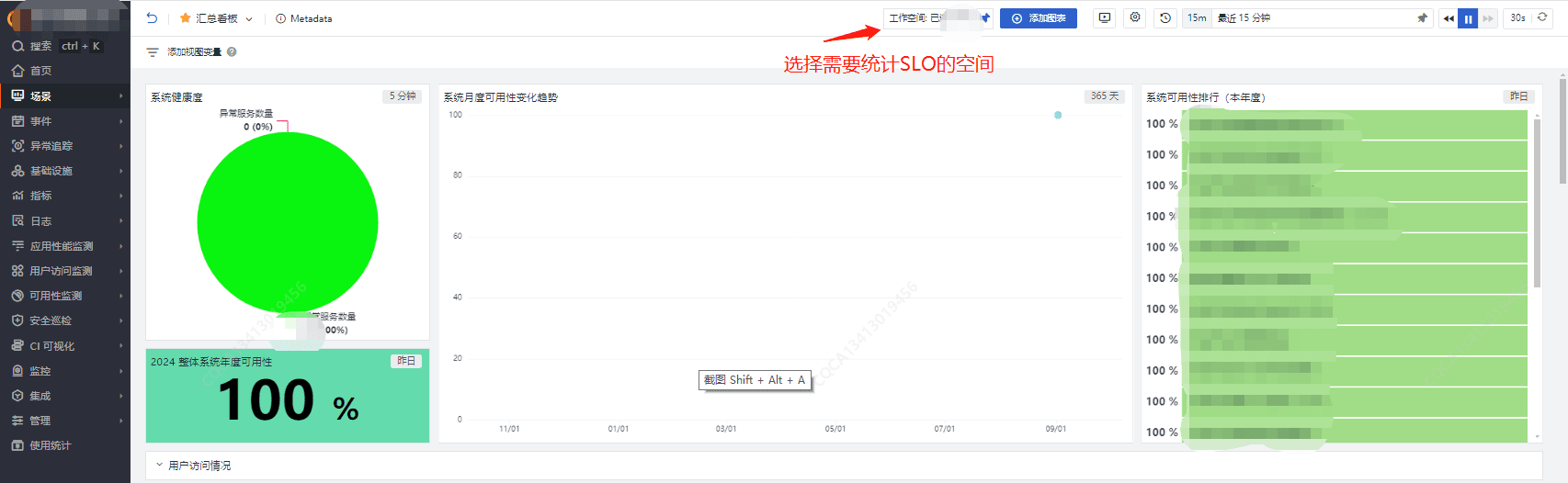
5. 仪表板展示
如下所示,最终可查看每年的服务总 SLO 情况,以及每月的趋势图、SLO 排行榜等。
Get a tailored plan
Contact us
Join the community

Scan with WeChat
to join the community
to join the community
Try Guance
Start online and pay only for what you use.
Get startedChoose a Guance plan